


In this Part 2 of ‘Adding Local Weather Conditions To Your App’, I’ll show you how to quickly add current temp, conditions, and today’s high / low temperature to your app.
If you’re lucky enough to already have the user’s zipcode or city and state, this should go very quickly for you. Otherwise, check out Part 1 (Integrating CoreLocation).
Let’s get started.
There are a handful of solid XML Weather APIs out there. The best one I’ve seen so far is Wunderground’s (it’s extremely well documented) but for the purposes of this tutorial, I decided to use Google’s “super secret” Weather API. It’s incredibly simple and should take care of all your basic weather needs. Though if you’re planning on releasing a production App, be sure to pick a public API and check out their TOS (some require API keys, or fees for production use). Here’s a good list of
Let’s look at some example calls to Google:
http://www.google.com/ig/api?weather=01451
http://www.google.com/ig/api?weather=nyc
http://www.google.com/ig/api?weather=Portland,OR
http://www.google.com/ig/api?weather=Jamaica
As you can see, there’s a bit of flexibility in how you can query the service. The one piece it’s lacking is querying by latitude and longitude. Lucky for you, I’ll show you how to use MKReverseGeocoder to determine your user’s City/State, which you can then plug right into the GET request. First, let’s take a quick look at the XML that comes back from the API:
<?xml version="1.0"?> <xml_api_reply version="1"> <weather module_id="0" tab_id="0" mobile_row="0" mobile_zipped="1" row="0" section="0"> <forecast_information> <city data="Portland, OR"/> <postal_code data="97217"/> <latitude_e6 data=""/> <longitude_e6 data=""/> <forecast_date data="2010-09-20"/> <current_date_time data="2010-09-20 23:46:50 +0000"/> <unit_system data="US"/> </forecast_information> <current_conditions> <condition data="Cloudy"/> <temp_f data="64"/> <temp_c data="18"/> <humidity data="Humidity: 55%"/> <icon data="/ig/images/weather/cloudy.gif"/> <wind_condition data="Wind: SW at 8 mph"/> </current_conditions> <forecast_conditions> <day_of_week data="Mon"/> <low data="51"/> <high data="66"/> <icon data="/ig/images/weather/partly_cloudy.gif"/> <condition data="Partly Cloudy"/> </forecast_conditions> <forecast_conditions> <day_of_week data="Tue"/> <low data="50"/> <high data="68"/> <icon data="/ig/images/weather/partly_cloudy.gif"/> <condition data="Partly Cloudy"/> </forecast_conditions> <forecast_conditions> <day_of_week data="Wed"/> <low data="53"/> <high data="68"/> <icon data="/ig/images/weather/sunny.gif"/> <condition data="Sunny"/> </forecast_conditions> <forecast_conditions> <day_of_week data="Thu"/> <low data="53"/> <high data="65"/> <icon data="/ig/images/weather/rain.gif"/> <condition data="Showers"/> </forecast_conditions> </weather> </xml_api_reply> |
All this should be pretty self explanatory. The two pieces to pay attention to here are current_conditions, and forecast_conditions. For our demo app, we’re simply going to display current temperature, conditions, a conditionsIcon, and today’s high and low temp. We’ll be able to pull all this information out of current_conditions and the first forecast_conditions (which is the forecast for today). In the interest of keeping everything organized, let’s build a class to hold our weather info.
// // ICB_WeatherConditions.h // LocalWeather // // Created by Matt Tuzzolo on 9/28/10. // Copyright 2010 iCodeBlog. All rights reserved. // @interface ICB_WeatherConditions : NSObject { NSString *condition, *location; NSURL *conditionImageURL; NSInteger currentTemp,lowTemp,highTemp; } @property (nonatomic,retain) NSString *condition, *location; @property (nonatomic,retain) NSURL *conditionImageURL; @property (nonatomic) NSInteger currentTemp, lowTemp, highTemp; - (ICB_WeatherConditions *)initWithQuery:(NSString *)query; @end |
In the .m we’re going to pull the data out of the XML and store it in our properties. There are several 3rd party Objective-C XML parsers. I’ve chosen to use Jonathan Wight’s TouchXML as it’s become somewhat of a standard for parsing XML on iOS. You can find it . You’ll have to jump through a couple hoops to get TouchXML into your project. Here’s an excellent that will walk you through the whole process if you’ve never done it before.
// // ICB_WeatherConditions.m // LocalWeather // // Created by Matt Tuzzolo on 9/28/10. // Copyright 2010 iCodeBlog. All rights reserved. // #import "ICB_WeatherConditions.h" #import "TouchXML.h" @implementation ICB_WeatherConditions @synthesize currentTemp, condition, conditionImageURL, location, lowTemp, highTemp; - (ICB_WeatherConditions *)initWithQuery:(NSString *)query { if (self = [super init]) { CXMLDocument *parser = [[[CXMLDocument alloc] initWithContentsOfURL:[NSURL URLWithString:[NSString stringWithFormat:@"http://www.google.com/ig/api?weather=%@", query]] options:0 error:nil] autorelease]; condition = [[[[[parser nodesForXPath:@"/xml_api_reply/weather/current_conditions/condition" error:nil] objectAtIndex:0] attributeForName:@"data"] stringValue] retain]; location = [[[[[parser nodesForXPath:@"/xml_api_reply/weather/forecast_information/city" error:nil] objectAtIndex:0] attributeForName:@"data"] stringValue] retain]; currentTemp = [[[[[parser nodesForXPath:@"/xml_api_reply/weather/current_conditions/temp_f" error:nil] objectAtIndex:0] attributeForName:@"data"] stringValue] integerValue]; lowTemp = [[[[[parser nodesForXPath:@"/xml_api_reply/weather/forecast_conditions/low" error:nil] objectAtIndex:0] attributeForName:@"data"] stringValue] integerValue]; highTemp = [[[[[parser nodesForXPath:@"/xml_api_reply/weather/forecast_conditions/high" error:nil] objectAtIndex:0] attributeForName:@"data"] stringValue] integerValue]; conditionImageURL = [[NSURL URLWithString:[NSString stringWithFormat:@"http://www.google.com%@", [[[[parser nodesForXPath:@"/xml_api_reply/weather/current_conditions/icon" error:nil] objectAtIndex:0] attributeForName:@"data"] stringValue]]] retain]; } return self; } - (void)dealloc { [conditionImageURL release]; [condition release]; [location release]; [super dealloc]; } @end |
I’ve decided to write my own init method to handle making the request to our API. This will make for a clean implementation in our view controller.
Before we get to implementing ICB_WeatherConditions, I’ll touch briefly on location. Part 1/2 of this tutorial covered finding your user’s latitude and longitude with Core Location. Use MKReverseGeocoder to find city/state from coordinates. Start by adding both the MapKit and CoreLocation frameworks to your project.
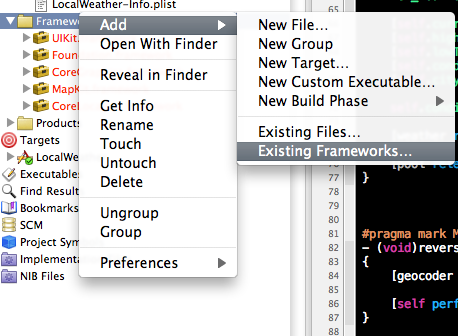
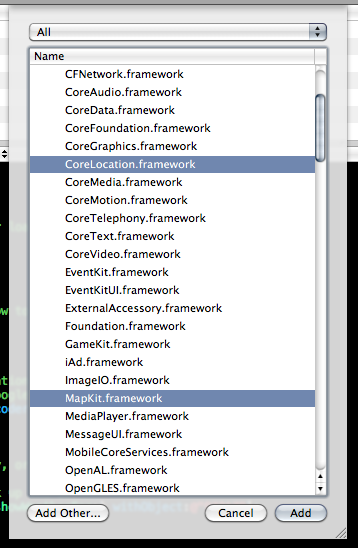
MKReverseGeocoder works asynchronously to resolve location info; it has a delegate. In our example we set the delegate to the view controller (self). Be sure to add to your header as well. Since your view controller is now the delegate for the geocoder, make sure to implement the delegate methods for the MKReverseGeocoderDelegate protocol:
#pragma mark MKReverseGeocoder Delegate Methods - (void)reverseGeocoder:(MKReverseGeocoder *)geocoder didFindPlacemark:(MKPlacemark *)placemark { [geocoder release]; [self performSelectorInBackground:@selector(showWeatherFor:) withObject:[placemark.addressDictionary objectForKey:@"ZIP"]]; } - (void)reverseGeocoder:(MKReverseGeocoder *)geocoder didFailWithError:(NSError *)error { NSLog(@"reverseGeocoder:%@ didFailWithError:%@", geocoder, error); [geocoder release]; } |
Now we’re ready to implement ICB_WeatherConditions. I usually populate UILabels in viewDidLoad, but since we’re making API calls and downloading a remote image (the weather conditions icon), I decided to write a method to execute in the background. This lets us use synchronous requests (which a lot easier to deal with) to handle network requests without locking up the main thread. Once our network calls have finished, we call back to the main thread to update the UI accordingly.
// This will run in the background - (void)showWeatherFor:(NSString *)query { NSAutoreleasePool *pool = [[NSAutoreleasePool alloc] init]; ICB_WeatherConditions *weather = [[ICB_WeatherConditions alloc] initWithQuery:query]; self.conditionsImage = [[UIImage imageWithData:[NSData dataWithContentsOfURL:weather.conditionImageURL]] retain]; [self performSelectorOnMainThread:@selector(updateUI:) withObject:weather waitUntilDone:NO]; [pool release]; } // This happens in the main thread - (void)updateUI:(ICB_WeatherConditions *)weather { self.conditionsImageView.image = self.conditionsImage; [self.conditionsImage release]; [self.currentTempLabel setText:[NSString stringWithFormat:@"%d", weather.currentTemp]]; [self.highTempLabel setText:[NSString stringWithFormat:@"%d", weather.highTemp]]; [self.lowTempLabel setText:[NSString stringWithFormat:@"%d", weather.lowTemp]]; [self.conditionsLabel setText:weather.condition]; [self.cityLabel setText:weather.location]; [weather release]; } |
Of course make sure your NIB is connected to your IBOutlets properly.
Now the final piece:
[self performSelectorInBackground:@selector(showWeatherFor:) withObject:@"97217"]; |
Build and Run:
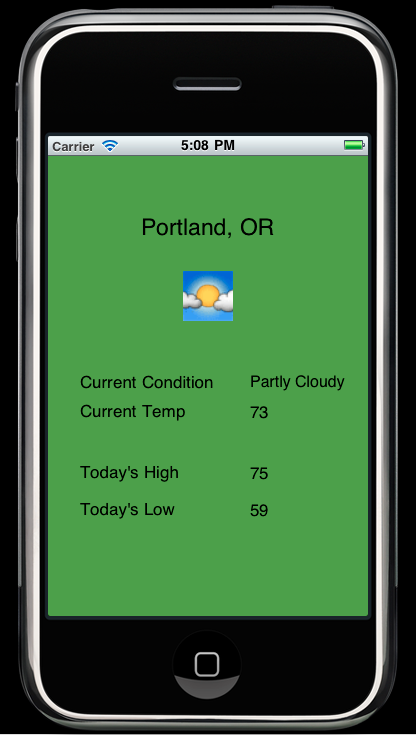
And you’re done!
You can see the complete class below. I’ve also posted a to github.
My name is Matt Tuzzolo (). I hope you found this post helpful.
// // LocalWeatherViewController.h // LocalWeather // // Created by Matt Tuzzolo on 8/30/10. // Copyright iCodeBlog LLC 2010. All rights reserved. // #import <uikit/UIKit.h> #import "MapKit/MapKit.h" @interface LocalWeatherViewController : UIViewController <mkreverseGeocoderDelegate> { IBOutlet UILabel *currentTempLabel, *highTempLabel, *lowTempLabel, *conditionsLabel, *cityLabel; IBOutlet UIImageView *conditionsImageView; UIImage *conditionsImage; } @property (nonatomic,retain) IBOutlet UILabel *currentTempLabel, *highTempLabel, *lowTempLabel, *conditionsLabel, *cityLabel; @property (nonatomic,retain) IBOutlet UIImageView *conditionsImageView; @property (nonatomic,retain) UIImage *conditionsImage; - (void)updateUI:(ICB_WeatherConditions *)weather; @end |
And the .m:
// // LocalWeatherViewController.m // LocalWeather // // Created by Matt Tuzzolo on 8/30/10. // Copyright iCodeBlog LLC 2010. All rights reserved. // #import "LocalWeatherViewController.h" #import "ICB_WeatherConditions.h" #import "MapKit/MapKit.h" @implementation LocalWeatherViewController @synthesize currentTempLabel, highTempLabel, lowTempLabel, conditionsLabel, cityLabel; @synthesize conditionsImageView; @synthesize conditionsImage; - (void)viewDidLoad { [super viewDidLoad]; if (1) //you have coordinates but need a city { // Check out Part 1 of the tutorial to see how to find your Location with CoreLocation CLLocationCoordinate2D coord; coord.latitude = 45.574779; coord.longitude = -122.685366; // Geocode coordinate (normally we'd use location.coordinate here instead of coord). // This will get us something we can query Google's Weather API with MKReverseGeocoder *geocoder = [[MKReverseGeocoder alloc] initWithCoordinate:coord]; geocoder.delegate = self; [geocoder start]; } else // You already know your users zipcode, city, or otherwise. { // Do this in the background so we don't lock up the UI. [self performSelectorInBackground:@selector(showWeatherFor:) withObject:@"97217"]; } } - (void)showWeatherFor:(NSString *)query { NSAutoreleasePool *pool = [[NSAutoreleasePool alloc] init]; ICB_WeatherConditions *weather = [[ICB_WeatherConditions alloc] initWithQuery:query]; [self.currentTempLabel setText:[NSString stringWithFormat:@"%d", weather.currentTemp]]; [self.highTempLabel setText:[NSString stringWithFormat:@"%d", weather.highTemp]]; [self.lowTempLabel setText:[NSString stringWithFormat:@"%d", weather.lowTemp]]; [self.conditionsLabel setText:weather.condition]; [self.cityLabel setText:weather.location]; self.conditionsImageView.image = [UIImage imageWithData:[NSData dataWithContentsOfURL:weather.conditionImageURL]]; [weather release]; [pool release]; } #pragma mark MKReverseGeocoder Delegate Methods - (void)reverseGeocoder:(MKReverseGeocoder *)geocoder didFindPlacemark:(MKPlacemark *)placemark { [geocoder release]; [self performSelectorInBackground:@selector(showWeatherFor:) withObject:[placemark.addressDictionary objectForKey:@"ZIP"]]; } - (void)reverseGeocoder:(MKReverseGeocoder *)geocoder didFailWithError:(NSError *)error { NSLog(@"reverseGeocoder:%@ didFailWithError:%@", geocoder, error); [geocoder release]; } - (void)didReceiveMemoryWarning { [super didReceiveMemoryWarning]; } - (void)viewDidUnload { // Release any retained subviews of the main view. // e.g. self.myOutlet = nil; } - (void)dealloc { [super dealloc]; } @end |