iPhone Coding – Turbo Charging Your Apps With NSOperation

  • Twitter
  • Facebook
  • Digg
  • Reddit
  • StumbleUpon
  • del.icio.us
  • Google Bookmarks
March 4th, 2010 Posted by: (ELC) - posted under:Tutorials

Introduction

So, let’s face it, MANY applications in the app store are “Clunky”.  They have jittery interfaces, poor scrolling performance, and the UI tends to lock up at times.  The reason? DOING ANYTHING OTHER THAN INTERFACE MANIPULATION IN THE MAIN APPLICATION THREAD!

What do I mean by this? Well, I am essentially talking about multithreading your application.  If you don’t know what is meant by multithreading, I suggest you read up on it and return to this post OR don’t worry about it because you don’t need much threading knowledge for this tutorial.  Let’s dig in and I’ll give you an example of the problem.

The Problem

When you create an application, the iPhone spawns a new process containing the main thread of your application.  All of interface components are run inside of this thread (table views, tab bars, alerts, etc…).  At some point in your application, you will want to populate these views with data.  This data can be retrieved from the disk, the web, a database, etc… The problem is: How do you efficiently load this data into your interface while still allowing the user to have control of the application.

Many applications in the store simply ‘freeze’ while their application data is being loaded.  This could be anywhere from a tenth of a second to much longer. Even the smallest amount of time is noticeable to the user.

Now, don’t get me wrong, I am not talking about applications that display  a loading message on the screen while the data populates.  In most cases, this is acceptable, but can not be done effectively unless the data is loaded in another thread besides the main one.

Here is a look at the application we will be creating today:
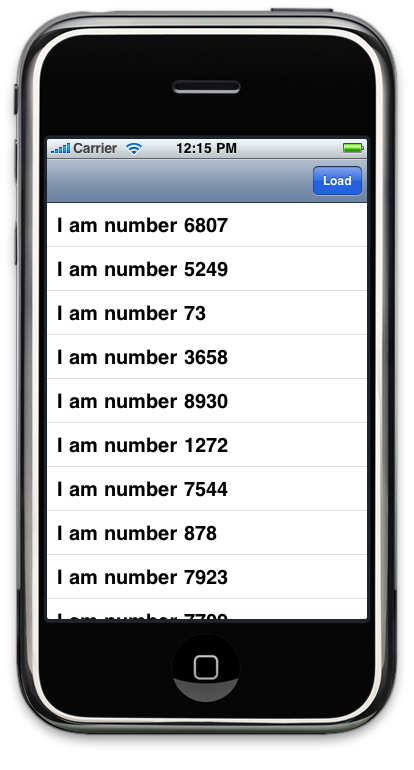
Let’s take a look at the incorrect way to load data into a UITableView from data loaded from the web.   The example below reads a plist file from icodeblog.com containing 10,000 entries and populates a UITableView with those entries.  This happens when the user presses the “Load” button.

Wrong (download this code here to see for yourself)

@implementation RootViewController
@synthesize array;
 
- (void)viewDidLoad {
    [super viewDidLoad];
 
    /* Adding the button */
    self.navigationItem.rightBarButtonItem = [[UIBarButtonItem alloc] initWithTitle:@"Load"
        style:UIBarButtonItemStyleDone
        target:self
        action:@selector(loadData)];
 
    /* Initialize our array */
    NSMutableArray *_array = [[NSMutableArray alloc] initWithCapacity:10000];
    self.array = _array;
    [_array release];
}
 
// Fires when the user presses the load button
- (void) loadData {
 
    /* Grab web data */
    NSURL *dataURL = [NSURL URLWithString:@"http://icodeblog.com/samples/nsoperation/data.plist"];
 
    NSArray *tmp_array = [NSArray arrayWithContentsOfURL:dataURL];
 
    /* Populate our array with the web data */
    for(NSString *str in tmp_array) {
        [self.array addObject:str];
    }
 
    /* reload the table */
    [self.tableView reloadData];
}
 
#pragma mark Table view methods
 
- (NSInteger)numberOfSectionsInTableView:(UITableView *)tableView {
    return 1;
}
 
- (NSInteger)tableView:(UITableView *)tableView numberOfRowsInSection:(NSInteger)section {
    return [self.array count];
}
 
- (UITableViewCell *)tableView:(UITableView *)tableView cellForRowAtIndexPath:(NSIndexPath *)indexPath {
 
    static NSString *CellIdentifier = @"Cell";
 
    UITableViewCell *cell = [tableView dequeueReusableCellWithIdentifier:CellIdentifier];
    if (cell == nil) {
        cell = [[[UITableViewCell alloc] initWithStyle:UITableViewCellStyleDefault
                reuseIdentifier:CellIdentifier] autorelease];
    }
 
    /* Display the text of the array */
    [cell.textLabel setText:[self.array objectAtIndex:indexPath.row]];
 
    return cell;
}
 
- (void)dealloc {
    [super dealloc];
    [array release];
}
 
@end

“Looks good to me”, you may say.  But that is incorrect.  If you run the code above, pressing the “Load” button will result in the interface ‘freezing’ while the data is being retrieved from the web.  During that time, the user is unable to scroll or do anything since the main thread is off downloading data.

About NSOperationQueue And NSOperation

Before I show you the solution, I though I would bring you up to speed on NSOperation.

According to Apple…

The NSOperation and NSOperationQueue classes alleviate much of the pain of multi-threading, allowing you to simply define your tasks, set any dependencies that exist, and fire them off. Each task, or operation, is represented by an instance of an NSOperation class; the NSOperationQueue class takes care of starting the operations, ensuring that they are run in the appropriate order, and accounting for any priorities that have been set.

The way it works is, you create a new NSOperationQueue and add NSOperations to it.  The NSOperationQueue creates a new thread for each operation and runs them in the order they are added (or a specified order (advanced)).  It takes care of all of the autorelease pools and other garbage that gets confusing when doing multithreading and greatly simplifies the process.

Here is the process for using the NSOperationQueue.

  1. Instantiate a new NSOperationQueue object
  2. Create an instance of your NSOperation
  3. Add your operation to the queue
  4. Release your operation

There are a few ways to work with NSOperations.  Today, I will show you the simplest one: NSInvocationOperation.  NSInvocationOperation is a subclass of NSOperation which allows you to specify a target and selector that will run as an operation.

Here is an example of how to execute an NSInvocationOperation:

NSOperationQueue *queue = [NSOperationQueue new];
 
NSInvocationOperation *operation = [[NSInvocationOperation alloc] initWithTarget:self
    selector:@selector(methodToCall)
    object:objectToPassToMethod];
 
[queue addOperation:operation];
[operation release];

This will call the method “methodToCall” passing in the object “objectToPassToMethod” in a separate thread.  Let’s see how this can be added to our code above to make it run smoother.

The Solution

Here we still have a method being fired when the user presses the “Load” button, but instead of fetching the data, this method fires off an NSOperation to fetch the data.  Check out the updated code.

Correct (Download the source code here)

@implementation RootViewController
@synthesize array;
 
- (void)viewDidLoad {
    [super viewDidLoad];
 
    self.navigationItem.rightBarButtonItem = [[UIBarButtonItem alloc] initWithTitle:@"Load"
       style:UIBarButtonItemStyleDone
       target:self
       action:@selector(loadData)];
 
    NSMutableArray *_array = [[NSMutableArray alloc] initWithCapacity:10000];
    self.array = _array;
    [_array release];
}
 
- (void) loadData {
 
    /* Operation Queue init (autorelease) */
    NSOperationQueue *queue = [NSOperationQueue new];
 
    /* Create our NSInvocationOperation to call loadDataWithOperation, passing in nil */
    NSInvocationOperation *operation = [[NSInvocationOperation alloc] initWithTarget:self
        selector:@selector(loadDataWithOperation)
        object:nil];
 
    /* Add the operation to the queue */
    [queue addOperation:operation];
    [operation release];
}
 
- (void) loadDataWithOperation {
    NSURL *dataURL = [NSURL URLWithString:@"http://icodeblog.com/samples/nsoperation/data.plist"];
 
    NSArray *tmp_array = [NSArray arrayWithContentsOfURL:dataURL];
 
    for(NSString *str in tmp_array) {
        [self.array addObject:str];
    }
 
    [self.tableView performSelectorOnMainThread:@selector(reloadData) withObject:nil waitUntilDone:YES];
}
 
#pragma mark Table view methods
 
- (NSInteger)numberOfSectionsInTableView:(UITableView *)tableView {
    return 1;
}
 
- (NSInteger)tableView:(UITableView *)tableView numberOfRowsInSection:(NSInteger)section {
    return [self.array count];
}
 
- (UITableViewCell *)tableView:(UITableView *)tableView cellForRowAtIndexPath:(NSIndexPath *)indexPath {
 
    static NSString *CellIdentifier = @"Cell";
 
    UITableViewCell *cell = [tableView dequeueReusableCellWithIdentifier:CellIdentifier];
    if (cell == nil) {
        cell = [[[UITableViewCell alloc] initWithStyle:UITableViewCellStyleDefault reuseIdentifier:CellIdentifier] autorelease];
    }
 
    [cell.textLabel setText:[self.array objectAtIndex:indexPath.row]];
 
    return cell;
}
 
- (void)dealloc {
    [super dealloc];
    [array release];
}

As you can see, we haven’t added much code here, but we have GREATLY improved the overall user experience.  So, what did I do exactly?

  1. Moved all of the processing (downloading) code from the loadData method to another method that could be run asynchronously
  2. Created a new instance of NSOperationQueue by calling [NSOperationQueue new]
  3. Created an NSInvocationOperation to call our method loadDataWithOperation
  4. Added the operation to the queue
  5. Released the operation
  6. When the Data has been downloaded, we reload the table data in the main thread since it’s a UI manipulation

One thing to note here is we never actually tell the operation to run.  This is handled automatically in the queue.   The queue will figure out the optimal time run the operation and do it for you.

Now that you have your downloading and processing in a separate thread, you are now free to add things such as a loading view.

I will be expanding on this tutorial in the coming week and showing you how to cache data and display old data to the user while the new is loading.  This is a popular technique used in many Twitter and News applications.

That concludes today’s tutorial.

Post questions in the comments or Ping me on Twitter.

Happy iCoding!

  • Renton

    This is veeeeeery useful!
    Thanks a lot!

    PS: reading your about page…. maybe when you started there was a lack of tutorials… now there are too many… but a lack of high quality tutorials!

  • Jim

    But when you reload the table data aren’t you now interacting with the UI from a thread other than the main application thread? Is that allowed?

  • http://brandontreb.com brandontreb

    @Jim I updated it to now reload the data in the main thread.

    Good catch.

  • iPortable

    I already familiar with threading for example performSelector, but the thing I would like to know is how to make a loop.
    I actually use NSTimer to fire a function every 3 seconds, is it also possible with NSOperation?
    And the other thing I want to know, how to break such a function for example if the view was closed when thread was still active?

  • http://www.uuindex.com/?p=396 2010-03-05 学习记录

    [...] 进度指示 MBProgressHUD 游戏AI基础 UIImageView + Touch Handling = UIButton 大批量数据iphone读取方法 [...]

  • http://shaiperednik.com/2010/03/iphone-coding-%e2%80%93-turbo-charging-your-apps-with-nsoperation/ iPhone Coding – Turbo Charging Your Apps With NSOperation » Shai Perednik.com

    [...] Go to Source Share and Enjoy: [...]

  • jose luis

    Wow .. this will really improve my application responsiveness.

    Thanks a lot !

  • Aaron

    I hope this isn’t too newbie of me, but what is the different between NSOperation and NSThread? For example, I have been kicking off a background process like this:

    [NSThread detachNewThreadSelector:@selector(myMethod) toTarget:self withObject:nil];

  • Horace Ho

    Thanks for the great tutorial! BTW, is it require to release the “queue” allocate from: NSOperationQueue *queue = [NSOperationQueue new];

    for example, if “loadData” will be called many times.

  • Martina

    You are changing self.array in the background thread. Won’t this cause all kinds of concurrency issues if the main thread is accessing self.array simultaneously (e.g. while scrolling)?

    Instead, I think you should create a new array in the background thread, and either assign this to self.array when done (this requires that self array is declared as atomic), or pass it to the main thread, and let it assign self.array (in which case self.array may be nonatomic).

  • http://maniacdev.com/2010/03/easier-threading-with-nsoperation-for-better-performance/ Easier Threading With NSOperation For Better Performance | iPhone and iPad SDK Development Tutorials and Programming Tips

    [...] new tutorial has been created called Turbo Charging Your Apps With NSOperation which illustrates some of the details of using the NSOperation classes and provides some iPhone [...]

  • http://www.oniphone.ru sid

    TY!!! Very necessary topic!

  • Scott

    Two ignorant questions:
    1) What’s the rationale behind using performSelectorOnMainThread, instead of say, a notification when loadDataWithOperation is done?
    2) Does NSOperation handle any necessary locking behind the scenes?

  • http://www.myfirstiphoneapplication.com Pierre

    Great tutorial thanks!

  • http://www.johnfromberkeley.com/2010/03/09/links-for-2010-03-09/ John From Berkeley » links for 2010-03-09

    [...] iPhone Coding – Turbo Charging Your Apps With NSOperation | iCodeBlog (tags: cocoa development iphone programming tips tutorials) [...]

  • Doug

    FANTASTIC code!

    Thank you!

  • Henri

    “I will be expanding on this tutorial in the coming week and showing you how to cache data and display old data to the user while the new is loading.”

    Do you want to say that you will use NSUserDefault to cache data and display it offline ? I would like to read your next tutorial, please please release it rapidly !!

    Thanks.

  • Brian Stewart

    I do not completely under stand why you use “new” when using the NSOperation Queue.
    “NSOperationQueue *queue = [NSOperationQueue new];”

    Also why do you use NSInvocationOperation instead of just NSOperation? Is there a big difference?

  • http://www.grataware.com/ mohrt

    [foo new]
    [[foo alloc] init]

    same thing, new is just shorter

  • Mike

    Sweet Tute!

    Can you let us know when you have done part 2, “how to cache data and display old data to the user while the new is loading” ?

  • http://www.boostaudience.com Ryan

    This is veeeeeery useful!

    I would like to add mobile ad from http://aditic.com, into tableView with the option to hide that ads.

    Thanks a lot!

  • Gonso

    Hi

    Great tutorial!
    Im using part of it to download some files for the user. In between files I want to move a progress bar and change a UITextView to let the user know what is going on.
    Since I read that one should change UI only on the main frame I considering something like this:
    [self performSelectorOnMainThread:@selector(updateProgressBar:) withObject:nil waitUntilDone:false];

    Is this the best approach?

  • SeniorEngineer

    Martina is correct, the code in this tutorial is NOT thereadsafe. It should be controlling concurrent access to the array or very bad things will happen.

  • Steven

    one improvement I can think of is to split the fetch into smaller chucks as multiple InvocationOperations, so you can display partial results to the user as the data is loading. This will make the “perceived” performance seem even better.

    i.e. display results as they come, don’t have to wait for all results.

  • http://www.table14software.com Ben

    You have a leak in the above code.

    /*Operation Queue init (autorelease) */
    NSOperationQueue *queue = [NSOperationQueue new];

    queue is not autoreleased like your comment says, go look up the +new method on NSObject in apples documentation.

  • Neha

    Wow!! Awesome post… Thanx… I’m also interested in how to cache data and display old data to the user while the new is loading… When are you going to post it?

  • http://mobworld.wordpress.com/ krishnan

    Hi Friend,

    Thanks for the wonderful tutorial. This really helped me.

  • Maciej Swic

    Just implemented this in my upcoming tower defence game for A* path calculation. 500-800ms lag for each time i update paths is now completely gone.

    It took 5 minutes to implement multithreading, I can only say WOW.

  • Janice

    > [foo new]
    > [[foo alloc] init]
    > same thing, new is just shorter

    What about release or autorelease?

  • Alek

    What’s the difference between this and loading data from a URL using NSURLConnection asynchronous mode?

  • http://ajonnet.wordpress.com Amit

    nice tutorial, it clearly explain how to play around nsoperation and nsoperation queue.

  • Max

    queue is not autoreleased, so you have a leak in your code above. I do it like this:

    NSOperationQueue *queue = [[[NSOperationQueue alloc] init] autorelease];

    [queue addOperation:[[[NSInvocationOperation alloc] initWithTarget:self selector:@selector(startFileLoading) object:nil] autorelease]];

  • Nathan Jones

    Wouldnt it be better to make queue an instance variable and then in loadData
    change it to this:

    - (void) loadData {

    /* Operation Queue init (autorelease) */
    if(self.queue == nil)
    self.queue = [NSOperationQueue new];

    This way you are not creating a queue every time a thread is spawned. You can use the existing instance of queue. Is this right?

  • Jmlee

    i am trying to work my way through the example. Could you send a link to the data.plist file?

    Thanks,

    John

  • http://www.facebook.com/people/Abhishek-Kalagoudra/642463996 Abhishek Kalagoudra

    hi brandontreb: This tutorial was superb “iPhone Coding – Turbo Charging Your Apps With NSOperation”…waiting for next version of this..” showing you how to cache data and display old data to the user while the new is loading.”

  • Cheap Air Jordan

    If you wish to succeed, you should use persistence as your good friend, experience as your reference, prudence as your brother and hope as your sentry.

  • chic

    thank you for this tutorial,

    I have 2 questions after it:
    . is there big performance difference using nsoperation or nsthread
    . is it possible to cancel the download thread, for example if user go back

  • http://nukemhill.wordpress.com/ NukemHill
  • A D

     How do you add the activity indicator?

  • K3ro_al

    its not working now.. its doing the same as the wrong one.. i cant see activity indicators with the download XD

  • Zeeshan Khan

    Hi Brandontred,
    Your tutorial is great.
    I have a query regarding limitations of NSOperationQueue.
    Is there any limitation of threads on NSOpearationQueue? How many operations we can add into a single NSOperationQueue object?

  • Emmanuel Castellani

    Hi,
    Tanks for this great tutorial, I’ve learnt a lot !
    But now I really want to add the caching system you were talking about at the end… Do you have something to share again…?
    Tnanks
    Emmanuel

  • Venkat

     How can NSOperation be used for a RSS feed being parsed in AppDelegate?

  • http://blank-sketch.com Dreamlane

    Sweet tutorial! Ultra-simple, and incredibly useful!

  • Mrd3650

    Thanks for this simple yet powerful tutorial, you saved me a lot of time understanding NSOperations and stuff..
    One thing i’m concerned about is that the Leaks tools is telling me that I have a leak in the NSOperationQueue, and in fact there is nowhere in the code that releases the queue. You have a comment however that says:

    /* Operation Queue init (autorelease) */
    Just above the creation of the queue in method:
     - (void) loadData

    Did you mean to initiate it with [autorelease] ? 

    Thanks again.

  • Gbm Gee

    Thanks for the tutorial…
    i need some clarification…
    the file is parsed automatically and if the file is xml wat we can do?

  • http://www.facebook.com/wuchiwo Steve Wu

    Simple and Great Tutorial

  • Sharlon Balbalosa

    I am researching about NSOperation because somebody in stackoverflow that I should avoid [NSThread detachNewThreadSelector: toTarget: withObject:] What is the advantage of using this?

  • http://www.facebook.com/sabau.radu Sabau Radu

    very good tutorial , I’d love to see a more complex NSOperation tutorial . Thanks for the example

  • Abdullah Umer

    The [super dealloc] should be called in the end of -(void)dealloc{}.

  • raees

    supeeeerrrrrrrrrrrrrrrrr

  • http://tolgaakin.com/ tolga

    Did you actually compile and test your code before posting it here? Because, the “correct” solution is almost identical to the “wrong” one. NSInvocationOperation implements a non-concurrent operation (see reference: http://developer.apple.com/library/mac/#documentation/Cocoa/Reference/NSInvocationOperation_Class/Reference/Reference.html). So, all operations will execute on the same thread, which, in your case is the main thread.

  • Raaf Vk

    awesommm, great jo

blog comments powered by Disqus