


Introduction
Back in July of last year. Brandon put up a post showing you how to integrate twitter into your application. Today I am going to take the class he made last year and add a new class which will let you post to twit pic. First lets do a little overview of what tools we need for this.
Required Tools
Twit pic is an awesome service. They have created a whole public API, that anyone can use to host a picture and post a tweet with a link to it. You can see the TwitPic API, and all its functionality .The API is pretty simple, with only 2 methods.
- uploadAndPost
- upload
We are going to only be implement access to the uploadAndPost method. In order to use the API we need to use an HTTP POST method. While Apple provides NSURLConnection to take care of operations like this, we are going to use a better third party framework called ASIHTTPRequest. You can find to download . I will go over the steps to get it installed. Just download the files for right now. You will also need to download some utility files that Apple created for users called Reachability. You can find those files .
Preparing a project to use ASIHTTPRequest
- Before we add the method into out TwitterRequest class, we have to do a bit of preparation with a project we want to use this framework witb. First think to do is to add ASIHTTPRequest and the Reachability classes into your application.
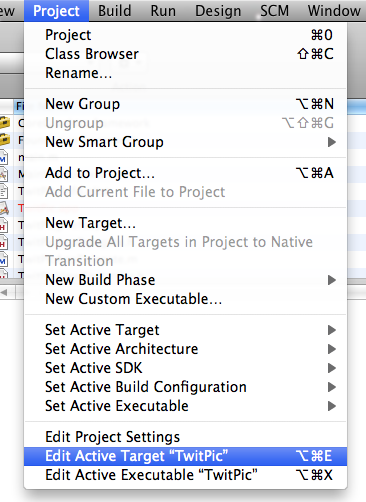
- Now we have to add some frameworks to out project by “Editing the active target”. Go to Project -> Edit Active Target “TwitPic”
- Add in the following targets: CFNetwork.framework, SystemConfiguration.framework and libz.1.2.3.dylib
Using ASIHTTPRequest to contact TwitPic
Now if we compile we should see no errors, and we will be able to use ASIHTTPRequest in our new method in out TwitterRequest class. The method to communicate with TwitPic is actually going to be very short. We need to create the method to send the picture and fill in the methods to handle the response. Lets take a look at what these methods look like.
Method to send picture to TwitPic
Here we are going to pass in the photo for twit pic along with the delegate that is using out class. This pertains back to the design decision made when developing the original TwitterRequest class. Look back at the first post for expansion on this. Here we create an instance of an ASIFormDataRequest. request is an instance variable I declared in the TwitterRequest header. Pass in the proper values for the proper keys, following along with the TwitPic API. We are going to start and Asynchronous request here, so the UI does not freeze while the picture is being uploaded.
-(void)statuses_update:(NSString *)status withPhoto:(NSData*)photoData delegate:(id)requestDelegate requestSelector:(SEL)requestSelector { isPost = YES; // Set the delegate and selector self.delegate = requestDelegate; self.callback = requestSelector; // The URL of the Twitter Request we intend to send NSURL *url = [NSURL URLWithString:@"http://twitpic.com/api/uploadAndPost"]; // Now, set up the post data: request = [[[ASIFormDataRequest alloc] initWithURL:url] autorelease]; [request setDelegate:self]; [request setData:photoData forKey:@"media"]; [request setPostValue:username forKey:@"username"]; [request setPostValue:password forKey:@"password"]; [request setPostValue:status forKey:@"message"]; // Initiate the WebService request [request startAsynchronous]; } |
Methods to handle response
We need to handle two types of response from TwitPic. Either the request will finish, or the request will error. If the request finishes the following will be called. We check that the delegate set for the TwitterRequest class is present and that is responds to the selector that was passed in. If it does, the TwitterRequest class will respond back to the class using it.
- (void)requestFinished:(ASIHTTPRequest *)request { NSLog(@"%@", [request responseString]); // do something with the data if(delegate && callback) { if([delegate respondsToSelector:self.callback]) { [delegate performSelector:self.callback withObject:receivedData]; } else { NSLog(@"No response from delegate"); } } // release the connection, and the data object [request release]; } |
This is the class that should be used to handle errors. This for example could display a UIAlertView saying that an error occurred.
- (void)requestFailed:(ASIHTTPRequest *)request { NSError *error = [request error]; } |
You can download the Header and Main for the updated TwitterRequest class here.