

Recently, I came across and fell in love with the idea of using XCode 4 snippets. Up until I read the post, I had heard they existed, but never really tried them. After reading the post, I began using his snippets as well as started creating my own. Now, I would say that my work-flow is faster than ever.
Here is a quick demonstration of the power of snippets
Type:
ttt |
It generates:
#pragma mark - UITableView Datasource - (NSInteger)numberOfSectionsInTableView:(UITableView *)tableView { return 1; } - (NSInteger)tableView:(UITableView *)tableView numberOfRowsInSection:(NSInteger)section { return 10; } - (UITableViewCell *)tableView:(UITableView *)tableView cellForRowAtIndexPath:(NSIndexPath *)indexPath { static NSString *cellIdentifier = @"Cell"; UITableViewCell *cell = [tableView dequeueReusableCellWithIdentifier:cellIdentifier]; if(cell == nil) { cell = [[UITableViewCell alloc] initWithStyle:UITableViewCellStyleDefault reuseIdentifier:cellIdentifier]; } cell.textLabel.text = [NSString stringWithFormat:@"Cell %d", indexPath.row]; return cell; } #pragma mark - UITableView Delegate methods - (void)tableView:(UITableView *)tableView didSelectRowAtIndexPath:(NSIndexPath *)indexPath { } |
As you can see, with 3 keystrokes, I now have a fully working table view implementation with sample data.
This article will be another introduction to XCode 4 snippets but focusing on how to set them up as well as share them with your team.
Adding A Snippet Inside Of XCode
In my opinion, this is not very obvious. The snippet library is fairly well hidden. To bring it up, first ensure that the right side bar is visible in XCode by selecting the right most option of the “view” pane in the top right corner of XCode.

Now that the right bar is available, click on the “{}” option of the bottom most pane. This will bring up the snippet library.
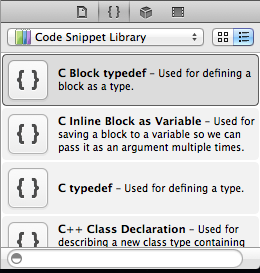
Feel free to browse the snippets that XCode ships with, however most of them are not very useful. So, now this is where I feel Apple engineers were a little too clever. It took me a little while to figure out how to actually add a new snippet. You would expect some sort of + button or something. The way you add a new snippet in this case is to write out a chunk of code and drag it into the Code Snippet Library window.
Once you drag the code into the library, it creates a default snippet called “My Code Snippet”. Which again, is just terribly non-obvious. Now, double click on “My Code Snippet”, and then click the “edit” button to modify it.
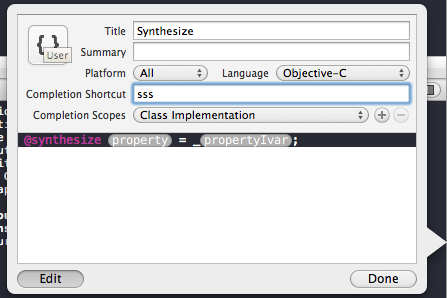
Let’s talk about each of the important fields:
- Title – This is just the common name you will use to refer to the snippet. It will display during autocompletion
- Completion Shortcut – this is the command you will use to invoke the snippet. For example, I have ttt to automatically create all of the UITableView delegate and datasource methods with sample data.
- Completion Scopes – This is pretty cool. You can have the same shortcut to represent differnet snippets based on the scope of the document. For example, you won’t want to invoke your @property snippets inside of your Class implementation. So, they get ignored…
Adding dynamic fields
If you notice, many of Apple’s auto generated classes or snippets (like UIAlertView), have these “code bubbles” hinting at the type of data you should put into them. They are also nice because they allow you to tab between them enabling you to implement the code quicker. To add your own simply insert this into your code:
<#Text#>
Where “Text” is whatever you want the code bubble to say.
That’s it, when you are finished click done and you should now be able to use your snippets.
Sharing Snippets
While XCode doesn’t have an export button for snippets, they are in a fairly predictable location. They are located at:
~/Library/Developer/Xcode/UserData/CodeSnippets/
That being said, you could manually share them between developers (zip them up and email) OR you could version control this folder with something like git. I really like the latter approach. Any time a developer adds a new snippet to the library, the others just have to pull, restart XCode, and voila the snippet is there.
Conclusion
The only issue now is remembering to actually use your snippets in practice. It takes some getting used to, but I’m sure you will get it. Below, you can download a zip file containing many of the snippets that I use. Simply unzip it into the folder that I mentioned above.
Happy iCoding!