Getting Images From The iPhone Photo Library Or Camera Using UIImagePickerController

  • Twitter
  • Facebook
  • Digg
  • Reddit
  • StumbleUpon
  • del.icio.us
  • Google Bookmarks
July 28th, 2009 Posted by: (ELC) - posted under:Tutorials

This will be a simple tutorial showing you how to access the iPhone’s photo library as well as the camera. Since the 3.0 update, the methods for picking photos have been deprecated. So this will be a 3.0 and above tutorial.

We will be creating an applicaiton that will allow you to pick a photo from the library or camera and display it on the screen. Here is a screenshot of what the app will look like:

photo 2

Let’s go ahead and get started…

1. Create A New View Based Application

I called mine photoApp (I will be using this name as reference)

2. Create The IBOutlets and IBAction

Open photoAppViewController.h and add the following code

#import
 
@interface PhotoAppViewController : UIViewController | UIImagePickerControllerDelegate, UINavigationControllerDelegate | {
	UIImageView * imageView;
	UIButton * choosePhotoBtn;
	UIButton * takePhotoBtn;
}
 
@property (nonatomic, retain) IBOutlet UIImageView * imageView;
@property (nonatomic, retain) IBOutlet UIButton * choosePhotoBtn;
@property (nonatomic, retain) IBOutlet UIButton * takePhotoBtn;
 
-(IBAction) getPhoto:(id) sender;
 
@end

Important: Replace the | in the interface declaration with < and >.  I just used the vertical pipe bc wordpress was replacing it with html encoding.

Notice that we implement the UIImagePickerControlDelegate and the UINavigationControllerDelegate. These are both needed to properly interface with the image picker. The rest of this stuff should be pretty strait forward if you have been reading our tutorials. We set up some outlets to the buttons we are using (this will be to determine which button was pressed). There is also and IBAction that will get called when the user presses either of the buttons. This method (getPhoto) will show the ImagePicker.

3. Create The Interface

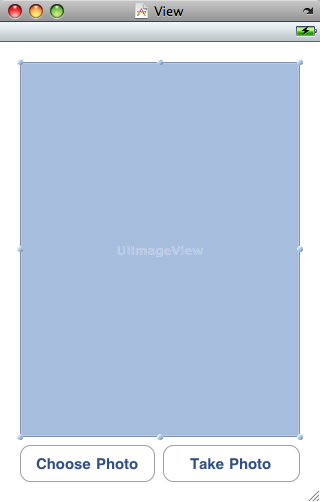
Open up photoAppViewController.xib in Interface builder and follow these steps:

  1. Drag a UIImageView on to the main view
  2. Set the Mode of the UIImageView to Aspect Fit in the Attribute inspector
  3. Drag a UIButton on to the view and title it Choose Photo
  4. Drag another UIButton on to the view and title it Take Photo

The interface should look something like this:
screenshot_01

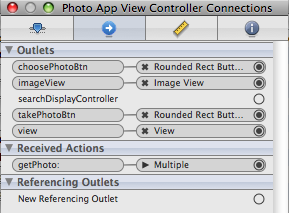
4. Connect The IBoutlets and IBAction

  1. Connect choosePhotoBtn to the UIButton titled Choose Photo
  2. Connect takePhotoBtn to the UIButton titled Take Photo
  3. Connect the imageView to the UIImageView
  4. Connect the Touch Up Inside callback on each of the buttons to the getPhoto method

When you click on File’s Owner the connection inspector should look like this:
screenshot_01

Close Interface Builder

5. Implement The getPhoto Method

Open PhotoAppViewController.m and add the following code:

@synthesize imageView,choosePhotoBtn, takePhotoBtn;
 
-(IBAction) getPhoto:(id) sender {
	UIImagePickerController * picker = [[UIImagePickerController alloc] init];
	picker.delegate = self;
 
	if((UIButton *) sender == choosePhotoBtn) {
		picker.sourceType = UIImagePickerControllerSourceTypeSavedPhotosAlbum;
	} else {
		picker.sourceType = UIImagePickerControllerSourceTypeCamera;
	}
 
	[self presentModalViewController:picker animated:YES];
}

Make sure you synthesize your view properties.  Here is what is going on in this method.

We first create a new UIImagePickerController object.  This is a view controller and can be displayed any way you would normally display a view controller (pop on to a navigation view stack, load in a tab view, present as modalviewcontroller).  Next, we set the delegate of the picker to our viewController.  This just means the picker will call a method inside of this class when the user picks a photo.

Next, we determine which button was pressed.  Since both buttons were connected to this method, we can see which one called it by using ==.  Now, here is where Apple has done a great job.  The difference between displaying the camera and photo library comes from setting a single property in the picker.  Looking at the code, it should be pretty obvious which is which.

Finally, we call presentModalViewController with our picker.  This will animate the picker into view from the bottom of the screen to the top.  Depending on the button you press, you should see one of the views below:

photo 3photo

6. Displaying The Selected Image

Once a photo is selected or taken, the ImagePicker will callback to a method in our class called didFinishPickingMediaWithInfo.  Add the following code to your PhotoAppViewController.m file.

- (void)imagePickerController:(UIImagePickerController *)picker didFinishPickingMediaWithInfo:(NSDictionary *)info {
	[picker dismissModalViewControllerAnimated:YES];
	imageView.image = [info objectForKey:@"UIImagePickerControllerOriginalImage"];
}

The first line just hides the picker.  The next sets to image property of our image view to an image returned from the picker.  The picker actually returns an NSDictionary.  That is because the other key UIImagePickerControllerMediaType; will return whether this is a video or an image.

And there you have it.  A way to get photos from the iPhone’s image library or camera.  If you have any comments or questions, feel free to write them in the comments section of this post or write them to me on twitter.  You can download the source below. Happy iCoding!

iPhone Tutorial – PhotoApp.zip

  • Jeremy

    great tutorial. thanks!

  • Ray

    Awesome tutorial. Thanks for keeping it simple and concise.

  • John

    Thanks for that Brandon. Timely as well. Am currently struggling with some issues relating to use of the camera.

    Any ideas about how to check, and then correct if necessary, the orientation of a photo. I am passing it through UIImageJPEGrepresentation to post as data via an HTML post but it disregards the orientation of the photo when doing this.

  • Zach

    You have a memory leak – you never release your picker object.

  • Marcelo

    Hey Brandon, nice tutorial.

    One question: Once you try to take a picture I get a message:
    “__TERMINATING_DUE_TO_UNCAUGHT_EXCEPTION__”. Even with your sourcecode. Why’s that?

    Thanks.

  • http://brandontreb.com Brandon

    @Marcelo,

    Hrm… I don’t know. Are you compiling it for 3.0?

  • Marcelo

    Aye, compiling with 3.0 – Simulator. No clue though what is causing this.

  • http://www.objectmethod.it Ivan Rosina

    Thanks !

    Do you think is possible overlay a hat image while taking a photo ?

  • Zachary

    Nice! I’ve been lookin for some tutorials like this, I was wondering if you guys could post one on using a slider to adjust the iPhone or iPod’s system volume, and how to access music player controls? Those ones would be fun to check out

  • Lars

    @marcelo:

    I dont think the ssimulator can use theese methods.. Try compilig for device!

  • AJ

    Brandon,

    Nice tutorial. I tweaked it and set the mediaType of picker controller to kUTTypeMedia which shows only the video recorder – which is what my requirement is. (This is for 3GS)

    However I am stuck at one place. I want the camera/recorder to start recording automatically when my showPicker method is called.

    Any clue how I can achieve this would be a great help!

    Thanks,
    AJ

  • Aaron

    I’m getting the uncaught exception, too.

  • http://www.micnguyen.com Mic Nguyen

    How can you save the image into the gallery folder of the iphone after you hit the “Use” button on the camera interface?
    Thanks in advance

  • http://abilenestartups.com Chad Hutchins

    Thanks for the tutorial! Works great

  • http://www.iPhoneToot.com Dave

    great tutorial! Thank you. Check out iPhoneToot.com for more tutorials!

  • jamey

    In 3.0, after hitting the “Use” button after taking a picture, there is NO progress indication while the image is being saved. Has anyone figured out how to create a callback when the “Use” button is selected? Given that it takes a few seconds to process the image after hitting “Use” I want to display some sort of progress(activity) indicator during this time.

    Thanks for the useful post and code!

  • fdqps

    Hi,

    I have 3.1 installed (SDK, iPhone and on a 3Gs) but only get the camera icon not the video recorder icon.

    Any clues?

    Best regards @fdqps

  • Ryan

    @Marcelo, that is because you are running this on simulator, if I am correct…

    Anybody know how I can save the image for later use in the app then (in a UIImageView). Please, this is the last little addittion I need for my app and it’ll be a few weeks of beta testing and little interface improvements away from hitting the app store, so any points in the right direction will be greatly appreciated!

  • Karl

    Hi,
    I’m new to all this. I’ve tried creating this app and everything is fine. BNut when I press Build and Go the Simulator launches but when it tries to launch the app finder give me a message saying it has crashed. Any ideas why?

  • Radikal Edward

    hi,

    Have you seen the attach effect when run Photos app and you select send by email option, that when all the background turn in dark, and make the image tiny, and then, attach the image in the Mail App, What you think about it!!, how could i do the same?…thanks

  • Jeff

    Is there anyway to set the picked image as iPhone wallpaper?

  • http://www.earbudzstore.com/ John

    The White silicon case for Ipod Touch is simply class and more stylish and makes the Ipod Touch good loking. This way you can keep your Ipod Touch safe and scratch resistant.

  • http://www.demansol.com Tirthankar

    HI
    Does any one know how to get the cropped image from library.

    Thanks

  • http://spidysuniverse.blogspot.com sPidy

    Just wanted to know if there is a way i can get my own images which are not in the photo library?
    The thing is, I am getting my images from a database. so how do I populate an image picker from the images in the database?
    a tutorial would be really helpful.
    Thanks in advance

  • iphonedev

    i have a question
    can i access the whole address book at once and maybe send data using a http request

    does apple allow us to do that

  • Tomy Carey

    Great tutorial! I was wondering if somebody knows how I can use the same idea to take a picture for example, and then attach it to a in app email?? thanx!

  • http://cyworld.com/jungjebi Daniel

    It was awesome! However, I am a novice unfortunatelly.

    If I want to see pictures through a simulator, what directory do I put pictures into?

    I don’t have iPod and iPhone now.

  • Satyam

    Hi AJ,
    You posted “Nice tutorial. I tweaked it and set the mediaType of picker controller to kUTTypeMedia which shows only the video recorder – which is what my requirement is. (This is for 3GS)”
    Can you share your code with me. My email id is “satyam90@indiatimes.com” I’m struggling with recorder tutorial.
    Thanks,
    Satyam.

  • Tarun Sharma

    Hello,

    Thanks for the tutorial. I am using UIImagePickerController from one of my application and facing very strange problem. When i select an image from library and display it in imageview the memory consumption become very high (from 2.5MB to 12.9 MB, incase i select heavy image) and never came down again. If i comment the line which display the image in imageview the memory does not rise up at all. Can you please help me on this as i m really struck on this issue.

    What i exactly do when selected image from imagepicker controller i saved it in application delegate UIimage type variable and then display it using setimage.

    Thanks
    Tarun sharma

  • Satya

    Hi Brandon,

    I have small doubt, can you clarify,

    I want to get images with thier names, with out using imagePickerController. How can I?

    Please Help me.

    Thanks,
    Satya

  • http://bestcampstove.com/ Benson

    This is so awsome…cant wait to bookmark this post, and I think I should feed your blog….have a good day,man.

  • http://www.owensoundstudios.com Corey Johnson

    Thanks so much for this. Your tutorials are by far the best on the web and are very easy to follow- plus you provide a download to the source which is really helpful for debugging :)

    Do you have a link to donate funds?

  • Russell

    Hi I am wondering how do I send the picture to UIWebView?

  • Neak

    Hi, Brandon
    when I invoke [self presentModalViewController:picker animated:YES] method, could I get a video recording pop-up window instead of a still picture camera view?

  • Siddharth

    Hi I’m facing an issue…

    After selecting an image from the saved photos library, it does no load up onto the image view.

    The screen stays blank. Any idea why?

    PS: Testing on iPod Touch and I’ve followed the tutorial as specified. There are no compilation errors thrown and no warnings either.

  • kaps

    Nice tutorial .I am new in iPhone development and need to build app just like ‘Photos’ in iPhone(Picking images and slideshow…) so pls help me how to build silde show on UIImagePicker……like after didFinishPikickingImge how to get image array so that can start slide show……pls give ur valueable suggestion….

  • http://www.huzzahgames.webs.com Adrian


    MPVolumeView *volumeview = [[MPVolumeView alloc] init];
    [volumeview setFrame:CGRectMake(10, 360, 300, 34)];
    [self.view addSubview:volumeview];
    [volumeview release];

  • Leo

    Run this app on your iPhone, since this app uses camera. If you run this app in the simulator, then you will get this exception.

  • gnat

    Great tutorial,
    Any idea on how to put all the images from a particular photo album into an array? I am looking to do a slide show but cant find any info on how to access multiple photos. Want have a user select an album of photos from the uiimagepickercontroller.

  • vikrant patel

    hi, this is awsome tutorial….. thanx buddy…….. have a nice day……..

  • seihee

    Great job!
    it’s KOOOOOOOOOOOOOOOOOOOOOOL

  • nir

    Nice tutorial
    But i want a button in this to display next images
    how can i get this?
    plz reply

  • antney

    Would like to know if there is a way to access the photo library off of the iPad.
    I am trying to develop a web page and I know the photo name, number, etc, however, I have no idea how access the library on the iPad to get an value to use in the web page.

    Any ideas or assistance would be appreciated …
    Thank you,

    Antney

  • Zach

    Hi,
    Great Tutorial. Thanks a lot.
    Is it possible to download an image from server and write it to iPhone image gallery? Could you please provide some hints.
    Thanks,
    Zach.

  • Jayaprakash S

    Hi All,

    Currently i am doing one project based on Cocos2d game engine.So my project requirement is i want implement Screen recorder[Video recorder].After run my application i want record and save as a video files in my local directory.For that i don’t know how to start.If anybody having any ideas,please share with me.

  • Jinn

    great article! thanks.

  • Saibi Rocker

    Hi
    This tutorial is only for the purpose of still images, what should we do to capture a vedio in this code. Can anyone provide me the code to take a vedio…..
    I need it in hurry, any little help will be appreciated greatly in this regards

    Thanks

  • Soreng

    Is it possible to get a button to send you to the camerea roll?

  • http://iddgroup.net Carl

    Im having trouble inserting this code into a navigation controller.

    it works perfectly as a stand alone program, but when i copy the files into my project, everything works EXCEPT the play button on videos.. it just crashes with a BAD_EXEC.

    cant figure it out for the life of me. i think it has something to do with the fact im using a navigation controller. Im getting the warnings:

    2010-11-30 15:32:42.905 PMSports[316:307] Using two-stage rotation animation. To use the smoother single-stage animation, this application must remove two-stage method implementations.

    2010-11-30 15:32:42.909 PMSports[316:307] Using two-stage rotation animation is not supported when rotating more than one view controller or view controllers not the window delegate

    the project is done, except for this, so i’d be happy to pay what you think its worth.

  • Jon

    Great Tutorial. I’m running into one small problem. MainWindow.xib is still loading instead of PhotoAppViewController.xib

    What am I doing wrong? I’ve copy the source code from your Tutorial but it still loads MainWindow.xib

  • Matt

    Jon, go into yourProjectName-Info.plist file, and change the ‘Main nib file base name’ from ‘MainWindow’ to ‘PhotoAppViewController’. Hope that helps.
    Matt

  • aToz

    thanks alot

  • pitnospb

    doesn’t work correctly with
    picker.sourceType = UIImagePickerControllerSourceTypePhotoLibrary;
    =((

  • Ssgsgsg

    Thanks man, this was really clear and helpfull :) :)

  • Guest

    Hi, I’m trying do build a similar App that would show the image picked (or taken) on another view, not the home page. Would you know how to do that ?

  • Benok

     I keep getting a synthesize property must be in implementation context after adding @ synthesize imageview, choosephotobtn, takephotobtn and Method definition not in @implementation:disqus 
     context after -(IBAction) getphoto: (id) sender {What to do 

  • Rmyers

    How would this be different if you wanted to do a video instead?

  • Guest

    How would you get it to save on the iPad or be able to upload it somewhere?

  • AMIT RAJ

    Thanks Man! :)

  • http://upenkothiya.elance.com upen kothiya

    its good, my friend….

  • Murat Dzhusupov

    Thank you very much. It helps me to make my job project today (Russia, Novosibirsk, Academgorodok)

  • Nitin Gohel

     how can i save photo album image in table view cell ???

  • Yasin

    Really Cool & Nice tutorial, it helps me a lot.

  • Ymatouq

    Hi, I’m trying do build a similar App that would show the image picked
    (or taken) on another view, not the home page. Would you know how to do
    that ?

    thanks for this tutorial
    but if i want to display the image that i chosen it in another view , different interface builder , how we can do that ?
     

blog comments powered by Disqus