Custom UITableViewCell Using Interface Builder

  • Twitter
  • Facebook
  • Digg
  • Reddit
  • StumbleUpon
  • del.icio.us
  • Google Bookmarks
May 24th, 2009 Posted by: (ELC) - posted under:Tutorials

Hey everyone, welcome to my first of many screencasts coming in the next few weeks. Today I am going to show you how to layout a UITableViewCell in Interface Builder and have a UITableView populate with those type of cells. I am adopting a new structure for my screencasts which will be 5 or so mintues of keynote slides giving background info followed by 20 – 25 mintues of step by step development. The entire video will be directly below this paragraph, but scrolling down you will see a text based step by step of the whole tutorial as well. Hope you guys enjoy.

Skill Level MEDIUM

Here is a link to the screencast to watch. We are working on getting an embedded version in, but I figure this is basically just as functional. Have fun!

Custom UITableViewCell Screencast Video

Source Code

Available Here

Background Information

picture-1

picture-2

picture-3

picture-4

picture-5

picture-6

picture-7

picture-8

picture-9

picture-10

picture-11

Building The App

Step 1

picture-12

This step shouldn’t require any extra information.

Step 2

picture-13

datasourceconnection

Step 3

picture-14

In CustomTableCellTutorialViewController.m you must define the two required UITableViewDataSource methods. These methods will fill up the table view with data. For now we will put in dummy data just to make sure all of our connections are working.

- (NSInteger)tableView:(UITableView *)tableView numberOfRowsInSection:(NSInteger)section

{

return 10;

}

- (UITableViewCell *)tableView:(UITableView *)tableView cellForRowAtIndexPath:(NSIndexPath *)indexPath

{

static NSString *CellIdentifier = @”Cell”;

UITableViewCell *cell = [tableView dequeueReusableCellWithIdentifier:CellIdentifier];

if (cell == nil){

cell = [[[UITableViewCell alloc] initWithStyle:UITableViewCellStyleDefault reuseIdentifier:CellIdentifier] autorelease];

}

[cell setText:[NSString stringWithFormat:@"I am cell %d", indexPath.row]];

return cell;

}

Step 4
picture-15

Here you will need to be in xCode and go to File -> New File…

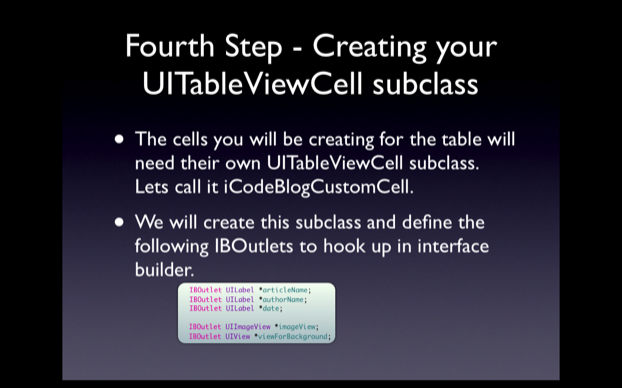
Select Objective C Class and make sure it is a UITableViewCell subclass, depending on your version of the SDK selecting this will differ. Look around and you will find it, call it iCodeBlogCustomCell. With this done enter these IBOutlets in the iCodeBlogCustomCell.h file enter the following IBOutlets:

IBOutlet UILabel *articleName;
IBOutlet UILabel *authorName;
IBOutlet UILabel *date;

IBOutlet UIImageView *imageView;
IBOutlet UIView *viewForBackground;

Add the @property and synthesize them in the main.

Step 5

picture-16

This step does not require and code but does require a lot of work in Interface Builder. I highly recommend you watch the screencast to see the step by step procedure here. Essentially what I do is create a new View XIB file. Opening this, I delete the standard UIView in the XIB and drag a UITableViewCell from my library into my document window. I assign the UITableViewCell to be of type iCodeBlogCustomCell. With this done layout the interface with the proper elements and hook them up by right clicking on the UITableViewCell in the document window.

Step 6

picture-17

This is where the real magic is. We are going to return to CustomTableCellTutorialViewController.m and edit the UITableViewDataSource methods we implemented earlier. The code I use has me putting in 4 separate PNG files that I add to my project. You can find your own to put inside the cells. Make sure the UIImageView inside the cell is set for Aspect Fit so you don’t have to worry about resizing the images.  The functions should be changed to be:

- (NSInteger)tableView:(UITableView *)tableView numberOfRowsInSection:(NSInteger)section
{
return 100;
}

- (UITableViewCell *)tableView:(UITableView *)tableView cellForRowAtIndexPath:(NSIndexPath *)indexPath
{
static NSString *CellIdentifier = @”iCodeBlogCustomCell”;

iCodeBlogCustomCell *cell = [tableView dequeueReusableCellWithIdentifier:CellIdentifier];

if (cell == nil){
NSLog(@”New Cell Made”);

NSArray *topLevelObjects = [[NSBundle mainBundle] loadNibNamed:@”iCodeBlogCustomCell” owner:nil options:nil];

for(id currentObject in topLevelObjects)
{
if([currentObject isKindOfClass:[iCodeBlogCustomCell class]])
{
cell = (iCodeBlogCustomCell *)currentObject;
break;
}
}
}

if(indexPath.row % 4 == 0)
{
[[cell authorName] setText:@”Collin Ruffenach”];
[[cell articleName] setText:@”Test Article 1″];
[[cell date] setText:@”May 5th, 2009″];
[[cell imageView] setImage:[UIImage imageNamed:@"1.png"]];
}

else if(indexPath.row % 4 == 1)
{
[[cell authorName] setText:@”Steve Jobs”];
[[cell articleName] setText:@”Why iPhone will rule the world”];
[[cell date] setText:@”May 5th, 2010″];
[[cell imageView] setImage:[UIImage imageNamed:@"2.png"]];
}

else if(indexPath.row % 4 == 2)
{
[[cell authorName] setText:@”The Woz”];
[[cell articleName] setText:@”Why I’m coming back to Apple”];
[[cell date] setText:@”May 5th, 2012″];
[[cell imageView] setImage:[UIImage imageNamed:@"3.png"]];
}

else if(indexPath.row % 4 == 3)

{
[[cell authorName] setText:@”Aaron Hillegass”];
[[cell articleName] setText:@”Cocoa: A Brief Introduction”];
[[cell date] setText:@”May 5th, 2004″];
[[cell imageView] setImage:[UIImage imageNamed:@"4.png"]];

}

return cell;
}

The End

So that is it for my first new post. I will be doing many more. Let me know your thoughts on this format in the comments. If you see anything organization wise that you think should be changed/add/removed let me know. Good Luck!

  • praveenm

    why we need to create separate xib for iCodeBlogCustomCell

  • praveenm

    Hi,

    Please let me know why we need to create separate xib for iCodeBlogCustomCell.

    Thanks

  • http://www.datalap.no PalTeknoBlog

    thanks man, great work,
    i have a question here that i searched many days and can not find a good answer, if i used xml feed ” like youtube ” for example, i can get all things works fine using indexPath.row, but problem that i want to add thumbnail to my UITableViewCell , i can set local imaage by using if methode, but i want to get image from xml file, i hope that u can u help me.

  • RoberRM

    I just wanted to thank you for taking your time to create such a great tutorial. You just made my life a little bit easier. :)
    Thank you! :D

  • rakesh

    Hi,

    i tried doing same thing,but i am gettings following error.Can you tell me where i went wrong ??

    Missing proxy for identifier IBFilesOwner
    this class is not key value coding-compliant for the key

    thanks

  • Fred

    Great screencast! Very professional! Thanks for all the hard work! Could you explain the rationale behind using the NSBunde/loadNibNamed to get a iCodeBlogCustomCell object? Would it be possible to create a -(id)initWithNibName initializer in the iCodeBlogCustomCell class and use something like cell = [[iCodeBlogCustomCell alloc] initWithNibName:iCodeBlogCustomCell]; ?

  • George

    The line

    NSArray* nibObjects = [[NSBundle mainBundle] loadNibNamed: @”iCodeBlogCustomCell” owner: self options: nil];

    which changes the parameter “owner” from “nil” to “self” fixes the “Missing proxy for identifier IBFilesOwner” for me.

  • http://www.iphone-ticker.de/2009/05/26/uitableviewcell-video-tipps-fur-iphone-entwickler/ iFUN.de/iPhone :: Alles zum iPhone − UITableViewCell: Video-Tipps für iPhone-Entwickler

    [...] iCodeBlog beschäftigt sich in seinem ersten Entwickler-Screencast mit dem Erstellen individueller “UITableViewCell“-Ansichten und zeigt  [...]

  • SW Mirage

    Cool tutorial. Thanks for this info. I like the new style of presentation.

  • http://www.ourlovingmother.org Podcaster

    Will you be posting the sample project like the other tutorials? I hope so it helps me.

  • http://www.rightsprite.com Collin

    Hey Podcaster. I will do that, I need to check with some people on how to get the CMS to hold that, I will get on it. Thanks for reading!

  • http://www.rightsprite.com Collin

    @FRED I have not tried that but I think that would work as well! I came across this handy piece of code and the “weight” of the processing was so minimal I didn’t think to try that. I will try to code that out and see if I can find any statistical performance differentials in Instruments. Thanks for reading!

  • http://www.rightsprite.com Collin

    @PalTeknoBlog That is a very good question. You can grab photos from URL provided by XML files. This involves using NSData. I will create a small tutorial on doing this for you very soon. Thanks for reading!

  • http://www.rightsprite.com Collin

    @praveenm I bet you could could just add a UITableViewCell to the document window of the MainWindow.xib. I simply chose not to. That is up to you, for organizational purposes I like to have mine separated. I don’t believe there is much of a performance sacrifice as a result of doing this. Thanks for reading!

  • http://humblecoder.blogspot.com/ HenrikB

    Well needed and very professional tutorail! How to create table view cells in Interface Builder and then use them in your application isn’t exactly “over documented” by Apple ;)

    In fact, I started writing a tutorial about this a few days ago and finished it a few minutes ago, so if you want to see an alternative way of doing this check out my blog and feel free to comment.

    http://humblecoder.blogspot.com/2009/05/iphone-tutorial-creating-table-cells-in.html

  • http://www.datalap.no PalTeknoBlog

    thanks man , waiting the NSData tutorial

  • http://www.lotofwallpapers.com Chintan

    Another great way of learning to make custom cells using IB is to read the book “Beginning iPhone Development”.

    It contains the best explanation for OpenGL and Quartz also.

  • http://www.paulsbarkans.com/ Pauls Barkans

    Extremely good tutorial. Thank you!

  • Matz

    Hi Colin,
    Im fairly new to xcode and understand this is a medium level tutorial but was hoping that you might be able to help me anyway.
    I get a warning in:

    cell = [[[UITableViewCell alloc] initWithStyle:UITableViewStylePlain reuseIdentifier:cellID] autorelease];

    warning is: -initWithStyle method not found

    and then the app crashes with:
    Terminating due to uncaught exception

    Any ideas?

  • http://www.rightsprite.com Collin

    @Matz. I believe the method is ok but the parameter you are passing is wrong. I believe the line should read.

    cell = [[[UITableViewCell alloc] initWithStyle:UITableViewCellStyleDefault reuseIdentifier:CellIdentifier] autorelease];

    Let me know if that works out for you. Thanks for reading!

  • Matz

    Colin, using the the above i get a error rather than a warning:

    error: UITableViewCellStyleDefault undeclared

    Oddly, doing a esc on initWith returns a list of initWithCoder, initWithFrame and initWithFrame:reuse… no initWithStyle…. and subsequent esc on UITableViewStyle only returns Style, StyleGrouped and StylePlain

    I just downloaded this sdk a couple of days ago so should be uptodate.

  • http://www.greenmansoftware.com Dan VanWinkle

    Two words:

    Switch
    Case

    Instead of all of those if-then-else-if’s, try this…

    switch (indexPath.row % 4) {
    case 0;
    [[cell authorName] setText:@”Collin Ruffenach”];
    [[cell articleName] setText:@”Test Article 1″];
    [[cell date] setText:@”May 5th, 2009″];
    [[cell imageView] setImage:[UIImage imageNamed:@"1.png"]];
    break;

    case 1;
    [[cell authorName] setText:@”Steve Jobs”];
    [[cell articleName] setText:@”Why iPhone will rule the world”];
    [[cell date] setText:@”May 5th, 2010″];
    [[cell imageView] setImage:[UIImage imageNamed:@"2.png"]];
    break;

    case 2:
    [[cell authorName] setText:@”The Woz”];
    [[cell articleName] setText:@”Why I’m coming back to Apple”];
    [[cell date] setText:@”May 5th, 2012″];
    [[cell imageView] setImage:[UIImage imageNamed:@"3.png"]];
    break;

    case 3:
    [[cell authorName] setText:@”Aaron Hillegass”];
    [[cell articleName] setText:@”Cocoa: A Brief Introduction”];
    [[cell date] setText:@”May 5th, 2004″];
    [[cell imageView] setImage:[UIImage imageNamed:@"4.png"]];
    break;
    }

  • http://www.greenmansoftware.com Dan VanWinkle

    dang, just noticed the semi-colons for case 0: and case 1:…

    Those should be : instead of ;

    my bad

  • lil

    Great screencast! Just what I needed. Looking forward to your next post.

  • Alex

    Thanks Colin,

    extremely useful tutorial. there is a warning which Xcode highlights for code. Can you provide a bit more details about this when you have time pls:

    [tableView dequeueReusableCellWithIdentifier:cellID];

    and my “presonal” questions: I did absolutely the same steps in my real application but for some reason my custom cell show label value (i have just one for begin) only when I select the row. In other words only selected row has a value for label. Can you advise on which direction it is better to look to fix it

    Thanks again

  • http://lessis.me softprops

    I am having the same issue as @Matz

    I get a crash with a warning

    warning is: -initWithStyle method not found

    I did a quick search in the docs and it appears this method is defined on UITableViewController not UITableViewCell

    There are also some inconsistencies between the screencast and the code you posted here. For instance the constant UITableViewCellStyleDefault is undefined for UITableView. In the screencast you use the constant UITableViewStylePlain which is a valid UITableView constant.

    I am wondering if there was some deprecations/changes in the SDK for us. It obviously worked in your screencast.

  • http://www.rightsprite.com Collin

    Hey guys,

    Ok so I believe I have figured out the problem. I am running the 3.0 SDK. I didn’t believe any of this was 3.0 stuff but apparently these small details are. With 3.0 only days away I will not have time to update them. I am sorry for the confusion but next week try this code again. It should work. Sorry again. Thanks for reading!

  • http://humblecoder.blogspot.com/ HenrikB

    When learning something, it’s often useful to read several author’s description of the same thing. So if anyone feels like reading more about custom UITableViewCell creation in Interface Builder, feel free to check out my blog!

    http://humblecoder.blogspot.com/2009/05/iphone-tutorial-creating-table-cells-in.html

  • zxed

    Mine crashes during the cellForRowAtInexPath…

    Question… the return type is supposed to be UITableViewCell.. but cell in the function is iCodeBlogCustomCell., so its returning the type iCodeBlogCustomCell…

    would that be causing the unexp app exception:?

  • zxed

    hmm thats not it., just remember that iCodeBlogCustomCell is derived from UITableViewCell

  • http://epcimovies.weebly.com Rushil

    Can you post the source code for this, because I am getting some errors andi don’t know why they are coming.

  • http://ProAidive.com James

    Dude! You rock

    Thank you for taking the time to do this tutorial. You explanation was simple and and exactly what I had been looking for.

    Add me to you mailing list if you have one.

  • http://www.rightsprite.com Collin

    SOURCE POSTED! Sorry for the delay.

  • http://www.tmuro.com William

    Hi,

    I tried to run the app in the simulator but I get a warning: Initialization from distinct Objective-C type.

    Do you know how to solve this?
    I noticed you get the similar warning in your screencast.

    Thank you
    William

  • Fernando

    @William

    I think that is just a warning to tell you that you’re using your own custom cell, rather than an actual error. Its fine here because we created the proper methods to support the table.

    @Collin

    One problem that I have with this is the images are blown way out of proportion and get re sized somehow. See
    http://screencast.com/t/ph7MjFwb7t

    But the project that I have is identical to yours.
    See:
    http://screencast.com/t/TNV867Jj
    and when i select the image view associated with the image
    http://screencast.com/t/p4Cqf5FQl

    Any help would be appreciated.

  • Amy

    I loved the tutorial, especially how it is differentiated from other UITableView tutorials through the use of the images and sub-headings.

    Could you possibly make a second step to this tutorial? I would love to see how you can click on each heading and learn how to drill down to further levels.

  • Fernando

    I figured it out. When I had copied and pasted the code from the blog, it uses the following line to set the image:

    [[cell imageView] setImage:[UIImage imageNamed:@"1.png"]];

    but if you follow the steps on the tutorial it should be:

    [[cell image] setImage:[UIImage imageNamed:@"1.png"]];

  • bjorn

    The source code link doesn’t work for me,
    Thanks

  • Anurag

    Could you write a small tutorial explaining how to fill table cells with XML data that we retrieve from any website?

  • http://www.bagonca.com Samuel Cyprian

    This was the best tutorial I have seen! Good work!

  • g

    Source Code link is not working. Can anybody please put a source code.

  • http://www.topace.cc Alan

    Fantastic tutorial, just what I needed!

  • DF

    SourceCode Link doesn’t work also for mel….

  • BeckzZ

    Hey,

    another great tutorial, thx fot that.
    It helped me a lot!

    But sourceCode-Link is still not working..would be fine if you’re able to fix that..cause I would like to use your images for this turoial..

    thx

  • iPhoneMMS

    The source code and video links don’t work.
    It makes my browser freezen.
    Would you put them up?

  • http://noneyet Omzig

    Well, i am messed up, only 1 of my images will show on my itouch. If i load it in the simulator they will all be shown. but when i try to load it on my iTouch it doesnt work verson 3.1.2

  • http://noneyet Omzig

    AHHHHHHHHHHHHHHHHHHHHHHHHHHHHHH………

    [[cell image] setImage:[UIImage imageNamed:@"icon1.png"]];

    [[cell image] setImage:[UIImage imageNamed:@"Icon2.png"]];

    Notice something? the darn @”icon1.png” is case sensitive. if you spell something wrong it will not show your image!!!!!!!!! Took me an hour to figure out that my images were not bad. The part that kicks my booty is that it works in the simulator and not the phone/touch. This REALLY burns. I learned something but please.

    Good tutorial man.

  • http://noneyet Omzig

    Also found that if you rename the PNG’s that doesnt always work, there must be some kind of meta data in the image or something… Hates Me!

  • Frederick C. Lee

    Excellent tutorial: simple, visual and to-the-point. I only wished it was a bit higher resolution. I’m looking forward to other tutorials. This one looks like it came out in May. It’s about time for another, don’ you think?

  • Frederick C. Lee

    The tutorial looked straight forward, but I’m having trouble with the customized cell view.

    I keep getting the warning: “Initializing with a Distinct Objective-C Type” at:

    CustomTableViewCell *cell = [tableView dequeueReusableCellWithIdentifier:CellIdentifier];

    Xcode/IB doesn’t appear to automatically instantiate the customized cell.

    Any ideas/

    Also, I notice that the IB’s File Owner wasn’t set/used. Shouldn’t the ‘File Owner’ icon bet set to the customized cell def?

  • http://geode.co.uk Mathew

    Hi, thanks for the screencast, it was very useful to me.

  • tnathos

    the link source code doesnt works…… pls any can post?

  • tnathos

    the link source code doesnt works…… pls any can post again?

  • Petchal

    hi,
    i have the same problem as Frederick. any advice? thanks

  • http://brandontreb.com brandontreb

    @Frederick @Petchal

    You need to cast it. So make this line:

    CustomTableViewCell *cell = [tableView dequeueReusableCellWithIdentifier:CellIdentifier];

    to

    CustomTableViewCell *cell = (CustomTableViewCell*)[tableView dequeueReusableCellWithIdentifier:CellIdentifier];

  • http://www.alduncedesign.com Isak Aldunce Atuan

    Excelente,, tutorial…good. Gracias..

  • Saad

    @COLIN

    Great Tutorial. I need some help. I am creating an app with a Tab Bar which gives me 5 views. On the 5th view, I want this fancy table. It loads the view of that page from a seperate nib called newsTable and conforms to the class newsTableViewController.

    I did exactly what you did but it keeps on crashes and tells me that it has gotten an uncaught something.

    Do you think it has anything to do with this line: NSArray *topLevelObjects = [[NSBundle mainBundle] loadNibNamed:@”iCodeBlogCustomCell” owner:nil options:nil];

    What is the owner? Should it be nil if I have a tab bar going on? I dont know what the problem is please help me!

  • Yev

    Collin, great stuff, helped me a lot !!!

    One tidbit that I ran into, the View that you use for the background view needs to be sized the same as the cell, I didn’t do this initially and some of the cell data was covered by the view. After clicking I would see the data but it was very weird to me on why it was happening. Took me a couple of days to figure it out and a couple of looks over other tutorial.

    Thanks, great work !!!

  • http://thomasbittel.wordpress.com/2009/12/09/custom-uitableviewcell-using-interface-builder/ Custom UITableViewCell Using Interface Builder « thomas bittel

    [...] Custom UITableViewCell Using Interface Builder Custom UITableViewCell Using Interface Builder [...]

  • http://www.jefferyfernandez.id.au Jeffery Fernandez

    Hi Collin,

    The download link for this project source-code is broken now :(

  • http://blog.brianlane.com bcl

    Good job! Thanks for posting the slides and text. It would be a bit more readable if you used a source highlighting plugin, but I was able to follow it just fine and it works great for me.

  • ab

    Unable to download. Link Broken.

  • http://www.aaatrailerparts.com barry

    Trailer Axle and Trailer Parts
    Find all your trailer parts for Trailer repair and custom built trailer axles for replacement or repair

  • Jonas

    Hi! How do I create a listener for every cell? I want to be able to press the cell and if I do so, I want another window to open with more information.. thanks for a great tutorial!

    keep up the good work!

  • http://www.nushindusociety.org Susanth

    Great Tutorial!!
    After spending a considerable amount of time looking through other websites which led me to really complicated stuff, your tutorial made it really easy to follow. THANKS!!

  • oisweb

    what ‘s up ? setText is deprecated
    i work in SDK 3.2

  • jukus

    I put in 3 cells…My cell rendering behaviour is very strange, it only renders 1 cell, however when i select it, it renders the second. If i scroll the list, the first two disappear and the third appears.

    At first i thought it was related to the row hight not set correctly on the UITableView as changing this shows a worse, but similar behaviour. However, the hight here matches the height of the custom cell

  • jukus

    ahh, just spotted Yew’s comment about view size = cell size.

    Great Tut btw, thanks!

  • Rob

    Thanks for the EXCELLENT tutorial! I’m pretty new to “real programming” (I’ve just done some web stuff), but all the code examples and slides made it easy to follow along. Putting the custom tableViewCell in a custom class got my noggin spinning, and had a good idea. I wrote some functions that call threads and timers INSIDE the customView class, and as far as I can tell, they are being dequeued/reused the same way the the viewCell is. Lightning fast and modular.

    I only have one stubborn warning, “Incompatible Objective-C types initializing ‘struct UITableViewCell *’,expected ‘struct customCell*’

    Any Ideas? everything still works, but I want the comforting green “Build Succeeded”.

  • Rob

    never mind, brandontreb already posted a solution my problem:

    You need to cast it. So make this line:

    CustomTableViewCell *cell = [tableView dequeueReusableCellWithIdentifier:CellIdentifier];

    to

    CustomTableViewCell *cell = (CustomTableViewCell*)[tableView dequeueReusableCellWithIdentifier:CellIdentifier];

  • skander

    Thanx very well, it’s a very excellent tutorial :) )

  • http://xcodeviet.com iCodeveloper

    Nice Tut, thanks.

  • http://www.jeremygustafson.net Jeremy Gustafson

    Perfect – exactly what I needed. Thanks!

  • David

    The source link says the domain has expired. Is it available somewhere else?

  • Qamar

    You are dequeing the cell with indentifier but never assigning the identifier…please have a qlook

  • Athma

    Dude,

    You simply rock! I found your site just because of my good Karma. Appreciate what you do and the amount of effort you put in every article you write.

    God bless.

  • Afflick

    I’m pretty much an SDK noob, when it says “synthesize in the main”, can someone show me the exact line that’s needed? I assume it goes in iCodeBlogCustomCell.h

    Cheers

  • Afflick

    actually nevermind that, figured it out

    What mine’s doing now though, is not actually loading the program. The code compiles and the iPhone simulator starts up. But when I click on the icon, it starts, nothing happens, then it return to the home screen.

  • Afflick

    2010-08-31 15:30:43.708 iCodeBlogTable[25635:207] *** Terminating app due to uncaught exception ‘NSInternalInconsistencyException’, reason: ‘UITableView dataSource must return a cell from tableView:cellForRowAtIndexPath:’

  • nigs

    hi all..
    i have cast the code according to Rob told..there is no error in my source code but i can not see any output in my Simulator..so anybody can help me…
    I am new in this platform..

    thanks..

  • Devang Kamdar

    Hey I am getting the exact same error … did you figure out what was the problem?
    Thanks

  • Devang Kamdar

    Hey I am getting same problem … were you able to figure out what was the issue?

  • itay

    Thanks for the this! this is just what I’ve been looking for.

    I am getting a: “page not found” error when trying to load the source code. Any idea why?

    Thanks!!!

  • http://§§§§§ praveen p kumar

    TUTORIAL IS NICE BUT ME BEING A NEW PLAYER I AM NOT ABLE TO UNDERSTAND Y MY APPLICATION CRASHES EVERY TIME I GO INTO THE TABLEVIEW PAGE. SO PLS DO HELP ME TO SOLVE THIS

  • muaddib2011

    How would I integrate an RSS reader with this?

  • http://vivexsoftware.com Craig

    This is an awesome tutorial, exactly what i needed. Thankyou so much!!!!!!!

  • ray

    Thank you for the very well done tutorial!

  • appDev

    Plz add download link again….its broken..
    Someone else plz give download link

  • Coder

    The download link to the Source code is broken, could anyone fix it?
    Is it available anywhere else?

    PLEASE, FIX IT!
    Thanks!

  • adam

    someone please provide a link for the source code. the link is broken!

  • Jerold Hawkins

    Thanks for the assistance!

  • JEROLD HAWKINS

    anyone care to help me out with this issue. Whenever I build and run this program my app crashes.

    #import “iCodeBlogTableViewController.h”

    @implementation iCodeBlogTableViewController

    - (NSInteger)tableView:(UITableView *)tableView numberOfRowsInSection:(NSInteger)section

    {

    return 10;

    }

    - (UITableViewCell *)tableView:(UITableView *)tableView cellForRowAtIndexPath:(NSIndexPath *)indexPath

    {

    static NSString *cellID = @”customCell”;

    iCodeBlogCustomCell *cell =[iCodeBlogCustomCell dequeueReusableCellWithIdentifier:cellID];

    if (cell == nil)
    {

    NSLog(@”Cell created”);

    NSArray *nibObjects = [[NSBundle mainBundle] loadNibNamed:@”iCodeBlogCustomCell” owner:nil options:nil];

    for(id currentObject in nibObjects)
    {
    if ([currentObject isKindOfClass:[iCodeBlogCustomCell class]])
    {
    cell = (iCodeBlogCustomCell *)currentObject;
    }
    }
    }

    if(indexPath.row % 4 == 0)
    {
    [[cell vehicleName] setText:@”Acura”];

    [[cell imageView] setImage:[UIImage imageNamed:@"Acura"]];
    }

    return cell;

    }

  • tuckermax72

    Page Not Loading for Source Code!! Please fix this!! when i click on ‘Available Here’ the page that is loaded says FTP error.

  • johannes

    Hi!!

    Do you know how I can load two different custom cells with to different nib-files in the cellForRowAtIndexPath?

  • Stephen

    Nice tutorial. Very helpful. Thanks for taking the time to make it.

  • http://profiles.google.com/adhigadu Aditya Nalluri

    very nice…. would love to see more from you..thanks

  • Mohamed A.Karim

    Very Helpful.
    Thanks Collin!

  • http://profiles.google.com/masaniparesh paresh masani

    I can’t download the code. Can you please fix it. Thanks.

  • C.I.R.

    but, how can I create an array of image like array name to populate the TableView?

  • John

    would it be possible for you to load your example again please. The link is not working.

    I get in incompatible pointer type for the cell so I assume I have not set up things properly. The source would show me.

  • Nipszx

    The screen cast is missing in Step 5. duh, where is the video?

  • Ryan

    You’ll want to cast the cell being returned by that method call so:
    iCodeBlogCustomCell *cell = (iCodeBlogCustomCell *)[tableView dequeueReusableCellWithIdentifier:CellIdentifier];

    ~hope that fixes your warnings,
    Ryan, ryancrews.com

  • Derek

    Could anyone please provide source code? I am a bit confused about inserting table view into UIViewController. Should I create a IBOutlet for it?

  • http://www.iphonedevsdk.com/forum/tutorial-discussion/87890-problem-static-nsstring-cellidentifier-cell.html#post364924 Anonymous

    [...] might be silly but I am stuck on something really stupid! I am trying to go along this tutorial Custom UITableViewCell Using Interface Builder | iPhone Programming Tutorials and on this line : PHP Code: [...]

  • Sinithiker

    Really nice method to learn, congratulations and carry on!! “Mis respetos gran chaman programador”

  • Anonymous

    can any one help me with interface builder? i want to make a button to go back to my main screen but in stuck on how to do so

  • Thanaraj Jeganathan

    source code is not available…(if can make it possible…  it ll be helpfull for freshers)   but i let thank u for explained video,  nice…

  • Vofox

    Queries about custom development,web design, programming http://bit.ly/m0hNLu

  • Richard

    Thanks for the helpful tutorial. It explained how customising table view cells works really clearly.

    I do have one question on extending this. I want to create cells which have very different content and very different heights eg. text in one, buttons in another, and images in yet another. I assume that every cell must be of the same custom class so I would have to create a basic common class and then subclasses for each type of content right? Are you able to dynamically adjust the height of cells according to the content?

    Or would it be better not to use a table view at all but just insert each of the content types as separate views into a scrollable view and handle it myself? The trouble here that I see is that I lose all that memory management that Cocoa offers.

blog comments powered by Disqus