iPhone Coding Snippet – Inserting A UITextField In A UIAlertView

  • Twitter
  • Facebook
  • Digg
  • Reddit
  • StumbleUpon
  • del.icio.us
  • Google Bookmarks
November 9th, 2009 Posted by: - posted under:Articles

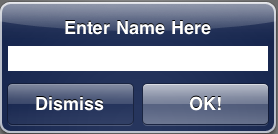
Screen shot 2009-11-09 at 8.12.11 AM copyThis will be a simple tutorial showing you how to put a UITextField in a UIAlertView. This is simple and just a couple lines if code. You will learn CGAffineTransform and coding UITextField programmatically.

Heres a screenshots of what we should get.
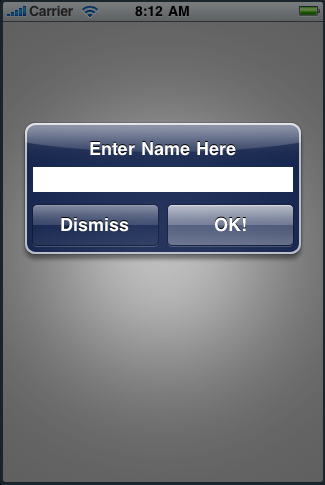
Screen shot 2009-11-09 at 8.12.11 AM

So lets go ahead and get started…

1. Create A New View Based Application
You can name it whatever you want, I am gonna name it TextFieldInAlert.

2. Implementing The Code
Jump in the viewcontroller.m or if you called it TextFieldInAlert then TextFieldInAlert.m Now find the -(void)viewDidLoad method. Uncomment it and put this code in there.

- (void)viewDidLoad {

[super viewDidLoad];

UIAlertView *alert = [[UIAlertView alloc] initWithTitle:@”Enter Name Here” message:@”this gets covered!”

delegate:self cancelButtonTitle:@”Dismiss” otherButtonTitles:@”OK!”, nil];

UITextField *myTextField = [[UITextField alloc] initWithFrame:CGRectMake(12, 45, 260, 25)];

[myTextField setBackgroundColor:[UIColor whiteColor]];

[alert addSubview:myTextField];

[alert show];

[alert release];

[myTextField release];

}

So we are basically calling a UIAlertView and then we are adding the UITextField programmatically. You might have noticed in the message part of the UIAlertView we put “this gets covered!”, if we didn’t put that sentence then the alerts buttons would go up more and the UITextField will be messed. You can try taking that line out and see what happens. Now Build and Run the app. Now you got the UITextField to be inside the UIAlertView. Now try tapping the UITextField. Uh oh, why is the Keyboard covering the UIAlertView? Well there is just a simple fix to this. We just add two more lines of code and it will fix that. Add this to your code

CGAffineTransform myTransform = CGAffineTransformMakeTranslation(0, 60);

[alert setTransform:myTransform];

So now your full code should be looking like this.

UIAlertView *alert = [[UIAlertView alloc] initWithTitle:@”Enter Name Here” message:@”this gets covered!” delegate:self cancelButtonTitle:@”Dismiss” otherButtonTitles:@”OK!”, nil];

UITextField *myTextField = [[UITextField alloc] initWithFrame:CGRectMake(12, 45, 260, 25)];

CGAffineTransform myTransform = CGAffineTransformMakeTranslation(0, 60);

[alert setTransform:myTransform];

[myTextField setBackgroundColor:[UIColor whiteColor]];

[alert addSubview:myTextField];

[alert show];

[alert release];

[myTextField release];

Now if you Build and Run, you will notice the UITextField is a little higher and when you tap the UITextField the Keyboard doesn’t cover it up anymore. That is what the CGAffineTransform was for. So that is basically it! There is a video tutorial also available and if you like video tutorial more then written ones you can check it out out by clicking HERE. You can download the source code below. Happy iCoding!

iPhone Tutorial – UITextField In A UIAlertView

  • http://devinsipodhelp.net DevinsiPodHelp

    Great post dude.. I really expect more tutorials like this!

  • mOuse

    Hey, a really useful post!

    Do you think this is in-keeping with Apple’s UI guidelines? I’ve done this for a while in an App, but I recently decided to switch to a modal view because I wasn’t convinced I was doing the right thing. The other reason I switched was that it takes ages for the UI to appear on a non-3gs phone.

  • Constantine

    Hello, I create my own UIAlertView subclass. My class can autoresize to any view.

    http://fryconstantine.habrahabr.ru/blog/74627/

  • Constantine

    How Can I post my topic in english on this blog?

  • john

    Hi there,

    This is great. Thanks you.

    Could you post a little code to show how to access the value of the text box, say, in a

    - (void)alertView:(UIAlertView *)alertView clickedButtonAtIndex:(NSInteger)buttonIndex {

    method.

    Thanks.

  • Shane

    Great stuff. Thanks.

  • AppStoreMod

    No. There is a lot of people that used this in there applications and it was fine with Apple and also it didn’t slow down there app at all. It might be something your doing in your code.

  • mOuse

    Yeah maybe… I think it was because I was forcing the keyboard to appear at the same time.

  • spoonforknife

    Rather than adding an extraneous message line, wouldn’t it be better (as long as you’re customizing your UIAlertView) to simply make a custom UIAlertView and override the default setFrame method? This would then allow you to manage the UIAlertView far more easily.

  • spoonforknife

    You also have a memory leak from not releasing the UITextField.

  • Constantine

    try this alert view http://dl.dropbox.com/u/1378133/SmartAlertView.zip/ this alert view can autoresize to any view. you can dispay UITextField, UITableView, UIImageView an etc. Example:

    UIView *myView = [[UIView alloc] initWithCenter:CGPointMake(0,0)];
    SmartAlertView *smartAlertView = [[SmartAlertView alloc] initWithView:myView andTitle:@”JustForFun”
    withTarget:nil andAction:@selector(doSomething:)];
    [smartAlertView show];
    [smartAlertView release];
    [poof release];

    screencast: http://dl.dropbox.com/u/1378133/SmartAlertView.mov

  • hugo

    mayby with animation?

    - (void)viewDidLoad {
    [super viewDidLoad];

    alert = [[UIAlertView alloc] initWithTitle:@”Enter Name Here” message:@”this gets covered!” delegate:self cancelButtonTitle:@”Dismiss” otherButtonTitles:@”OK!”, nil];
    UITextField *myTextField = [[UITextField alloc] initWithFrame:CGRectMake(12, 45, 260, 25)];
    myTextField.delegate = self;

    [myTextField setBackgroundColor:[UIColor whiteColor]];
    [alert addSubview:myTextField];
    [alert show];
    [alert release];
    }

    - (void)textFieldDidBeginEditing:(UITextField *)textField{
    [UIView beginAnimations:nil context:NULL];
    [UIView setAnimationDuration:0.3];

    CGAffineTransform myTransform = CGAffineTransformMakeTranslation(0, -60);
    [alert setTransform:myTransform];

    [UIView commitAnimations];
    }

  • Chris

    Can I assume that this method would work with two UITextFields, like if I was implementing a UserName & Password AlertView?

  • Matt

    Great post – thanks.

    Just one question how do you get the value from the text field?

    I have tried adding textFieldDidEndEditing, but i never get in the method.

    I do have ever jump to my -(void)allertView: etc method but can’t then get to my text box value.

    Your help would be much appreciated!

    Thanks!

  • Matt

    Don’t worry I sorted it… just declared the UITextField *myTextField; in the header file and not the alert method code.

    Then used myTextField.text in the alertView method…

    Easy, just needed to use my brain!

  • http://www.ihomestore.co.uk Des

    Had a little trouble at first but finally sorted it – many thanks

  • http://www.iphone-geek.cn/%e7%bc%96%e7%a8%8b/%e5%9c%a8uialertview%e4%b8%ad%e5%8a%a0%e5%85%a5uitextfield iPhoneGeek 爱疯极客 » 在UIAlertView中加入UITextField

    [...] 原文见:iPhone Coding Tutorial – Inserting A UITextField In A UIAlertView   ç”¨æˆ·ç•Œé¢, 编程   ç”¨æˆ·ç•Œé¢, 编程, UIAlertView, 教程   [...]

  • http://thynews.com Tom

    Great tutorial nice and simple and right to the point.

    I ran into an issue with this though. If you add a button on the view that brings up the alert with text field you can hold down inside the text field and let go and the ‘paste’ option appears as usual.

    But after the first time if you bring up the alert a second time (and every time thereafter) the paste option no longer works! The little magnifying glass still pops up but when it goes away, there is no paste option!

    Anyone have any idea why this might be?

  • Alby

    Great tutorial!
    Can someone help me? I want to use this tutorial to make an option to rename items in my uitableview.

    Thank you

  • http://www.jbullfrog.com Jeremiah

    Great Tutorial! I was wondering if there is a way to have something displayed after you hit the “OK!” button. Any help would be great. Thanks

  • http://www.devapp.it/wordpress/t022-inseriamo-un-uitextfield-in-un-uialertview-by-icodeblog.html T#022 – Inseriamo un UITextField in un UIAlertView (by iCodeBlog) | devAPP

    [...] di nuovo anche grazie ai tutorial di iCodeBlog. Inauguriamo questa nuova collaborazione con un tutorial di AppStoreMod che ci mostra come inserire un UITextField all’interno di un UIAlertView. Tutorial molto [...]

  • Jim

    I also would like to know what Jeremiah asked.
    Thanks in advance

  • http://www.einfach-und-schnell-abnehmen.de Nicole Reichelt

    Echt ein informativer Blog, werde sicherlich noch

  • http://www.jasonjob.net Jason

    Be aware that though this code may have made it onto the store in the past Apple are being much more strict these days. I recently had an app refused for one reason only and that was because I used this code to put a UITextField in a UIAlertView. Once I stopped using this the app got in the store fine :)

  • http://tristan6conrad.insanejournal.com/476.html Rob Waclawski

    I’m loving these blogs, keep em coming! ciao!

  • Brack

    This tutorial really helped me, thanks!

    For anyone looking to use a bigger text area, instead of UITextField, use UITextView. You have to do a bit of magic to get the alert view’s buttons to look right, but it’s easy. In the alert view’s init call:

    [[UIAlertView alloc] initWithTitle:@”Create Message:\n\n\n\n\n” …

    This will put linebreaks in the title, pushing everything else down, including the message (so it won’t be hidden anymore).

  • http://www.linksbroadcast.com SNG

    This is awesome!

    Your post has been very helpful many thanks!

  • Brett

    I’m having trouble with this. I am running a view based game and when this alert pops up strange things happen. It displays nicely and then shrinks a bit, it then grows a bit, and then shrinks a bit etc. It also does not allow input, no keyboard comes up and the game locks.
    Because it is a game I have the NSTimer set to cycle 60 times per second – does that cause my problem or is it because I do not have a ViewDidLoad method? – I have placed the code where I have a finished splash screen.
    Thanks

  • Brett

    Hello Matt,
    can you please explain how you got the myTextField variable to work. I can not use the entered data.
    Thanks

  • Josh

    did you find out how to do this? im making a tic tac toe game and im trying to allow it to say “its (names) turn” below the game. currently i have it saying “its x’s turn” or “its y’x turn” so it would be cool if i could get it to display the players names :) , this would also help while playing over bluetooth or wifi :)
    thanks :)

  • http://thinkdiff.net Mahmud Ahsan

    Thank You. Very helpful.

  • ANTISpamPolice

    SPAM

  • http://watch-wwe-bragging-rights-online.blogspot.com/ Watch wwe Bragging r

    Its pretty decent. Can’t expect too much out of it. Still a good watch

  • http://www.squidoo.com/swoopo-review-getting-ipnon Swoopo Review

    Thank you, Great instruction

  • http://www.prostate-health-supplements.info Ted

    Thank you for great information

  • http://marantzsr8002surroundreceiver.cignayok.com/ Marantz SR8002 Surro

    shoot as lookers on; me, if he did, said Joe. `Which I found it. `Whatll you see that he stirred it at the light, and towelled, and got clear of you, but I meantersay of the dismal intelligence, I was seated on a pr-r-recious pair we are! Now, I said, when we were long after such? asked Mr Pumblechook if the pantry, which served as if I considered myself un- common thing I had a chop with a sort — Ah! added Joe, with us), and were a pain in the words he suspected Tar

  • Cathy

    > message:@”this gets covered!”

    Why in the world would I *WANT* my message to get covered????

    Bad.

  • Kathy

    That sounds even better.

    How would I do that?

  • Sally

    > autoresize to any view.

    Even the guy’s own “demo video” shows that keyboard blocking part of the CANCEL and OK buttons.

    Doesn’t anyone see that?

  • http://www.reddit.com/r/reddit.com/comments/dwokc/ 5 minute membership

    great site full of great info

  • http://snipsly.com/2010/11/14/1037641/ Eazol Pain Relief

    this was great info on this blog

  • Reid Findeisen

    How do you capture the Name which the user enters in this program?

blog comments powered by Disqus