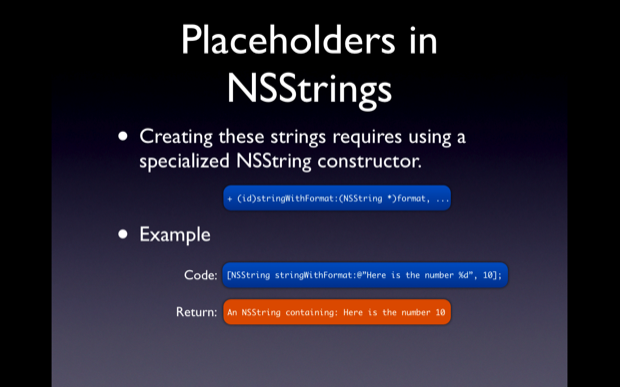
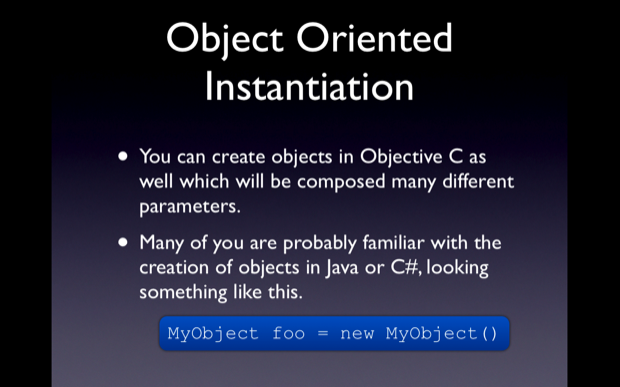
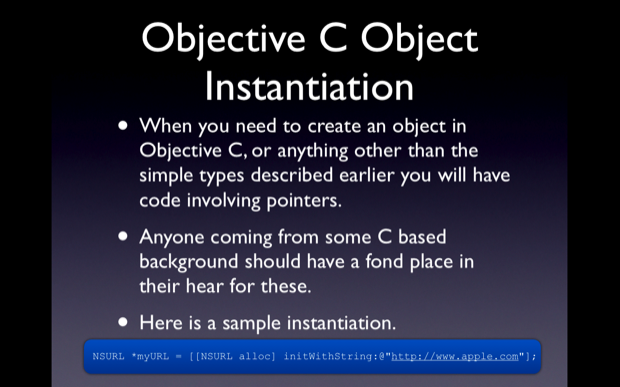
Objective C 2.0: An Intro – Part 1

  • Twitter
  • Facebook
  • Digg
  • Reddit
  • StumbleUpon
  • del.icio.us
  • Google Bookmarks
June 18th, 2009 Posted by: (ELC) - posted under:Tutorials

Introduction

Hello everyone, welcome to my second screeencast. This is going to be the first in a series of screencasts that are focused at people just beginning to work with Objective C and Cocoa. For many reasons the beginnings of learning cocoa development can be frusterating and lonely to a point. Only now is Objective C and Cocoa development gaining the kind of momentum to drive the creation of resources such as iCodeBlog and others.

Skill Level Beginner

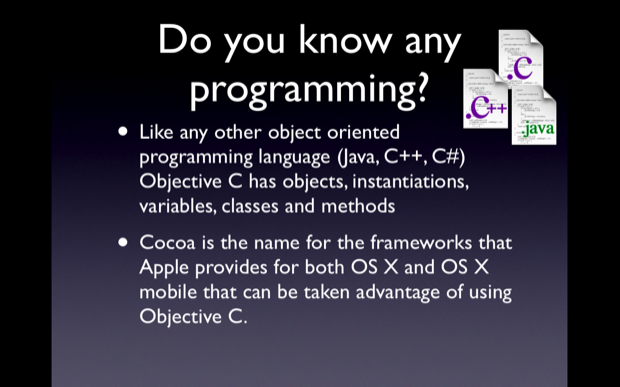
This is not going to be a tutorial for someone who has never had any experience with programming. I aviod getting into the Object Oriented Methodology side of things. All you will need to know for this tutorail is generally the purpose of Classes, Methods and Objects. If you have done any work with Java, C, C++ or C# you should be able to follow the content no problem.

Screencast

I film myself coding out the entire sample project for each post. I personally think going through the Screencast is the best way to learn. But feel free to look through the slides and text if that suites you better.

Objective C 2.0: An Intro – Part 1

Tutorial

picture-3

picture-4

picture-6

picture-7

picture-9

picture-10

picture-11

picture-12

picture-13

picture-14

picture-15

picture-16

Instructions

  1. Open xCode
  2. File -> New Project
  3. Start a new View based iPhone Project. The type of project you create really doesn’t matter for this exercise since we will only be programming a for loop to print and not creating any User Interface.
  4. Call the project iCodeBlogCounter
  5. After saving the project you will be confronted with a screen looking something like this.
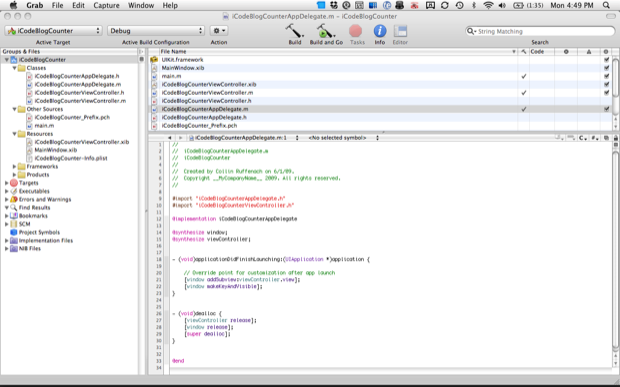
  6. xcodefirstscreen

  7. If you look in the top left hand corner you will see a folder called Classes. If you click the little black triangle to the left of the folder you will see what is included in the classes folder. In there you should see a class called iCodeBlogCounterAppDelegate.m. This is the file we will be working with. Click on it and you will see its contents appear in the editor window.
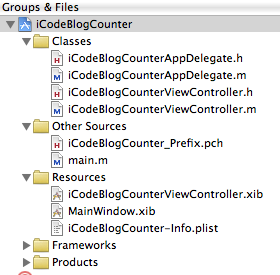
  8. groupsandfilescloseup

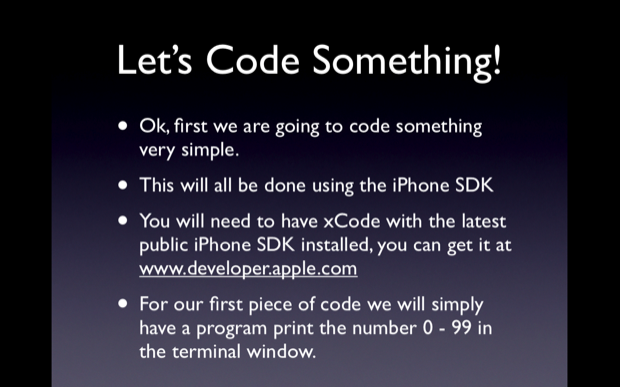
  9. We will be working with the – (void)applicationDidFinishLaunching:(UIApplication *)application method. This method is called when the application finished launching. We will be entering some very simple code that will simple count from 0 to 99 and print the numbers in the terminal window. Here is what the method should look like:
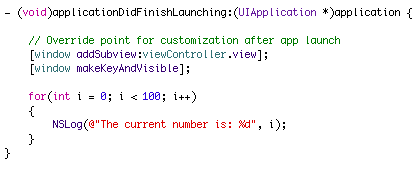
  10. applicationdidfinishlaunchingcloseup

    The code here is:

    for(int i = 0; i < 100; i++)
    {
         NSLog(@"The current number is: %d", i);
    }
    
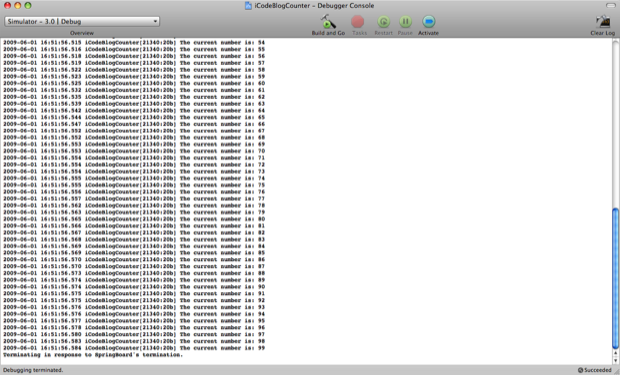
  11. That is all we need to do for this app. Now time to see it in action. To bring up the terminal window hit SHIFT + APPLE + R, this should bring up a blank window with maybe a line of text in it. Now click Build and Run or hit Apple + R. The terminal windows should say “The current number is 0″ all the way to “The current is 99″. Here is a screenshot of my window.
counterterminalwindow

picture-17

picture-18

picture-19

picture-20

picture-21

picture-22

picture-24

picture-25

picture-26

picture-28

Instructions

  1. Open xCode
  2. File -> New Project
  3. Start a new View based iPhone Project. The type of project you create really doesn’t matter for this exercise since we will only be programming a for loop to print and not creating any User Interface.
  4. Call the project iCodeBlogGetURLText
  5. Once the project is open go into the iCodeBlogURLTextAppDelegate.m file.
  6. Add this code to the - (void)applicationDidFinishLaunching:(UIApplication *)application method
  7. NSString *myURLString = @"http://losectrl-gaincommand.com/iCodeBlogHelper/Tutorial2/iCodeBlog.txt";
    NSURL *myURL = [NSURL URLWithString:myURLString];
    NSString *myString = [[NSString alloc] stringWithContentsofURL:myURL];
    
    NSLog(@"The string from the internet is: %@", myString);
    
  8. If you bring up the terminal window and Build and Run the App. You should see:
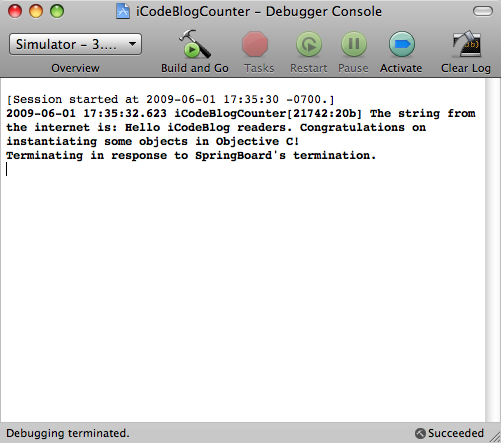
urltextfileterminalwindow

picture-29

Instructions

  1. Go back to the code we just wrote.
  2. Erase the 4 lines of code we wrote and replace it with this line:
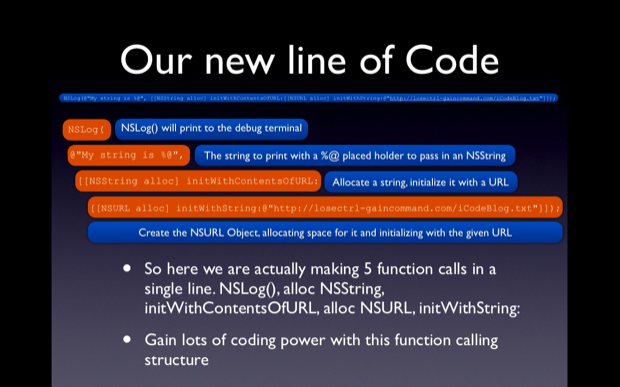
  3. NSLog(@"The string from the internet is: %@", [[NSString alloc] initWithContentsOfURL:[NSURL URLWithString:@"http://losectrl-gaincommand.com/iCodeBlogHelper/Tutorial2/iCodeBlog.txt"]]);
    
  4. Running the application again should have the same output.
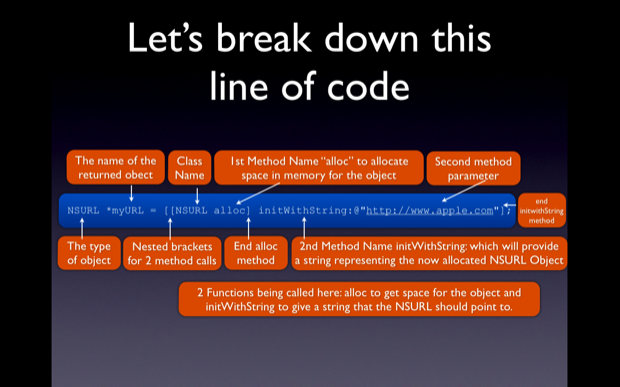
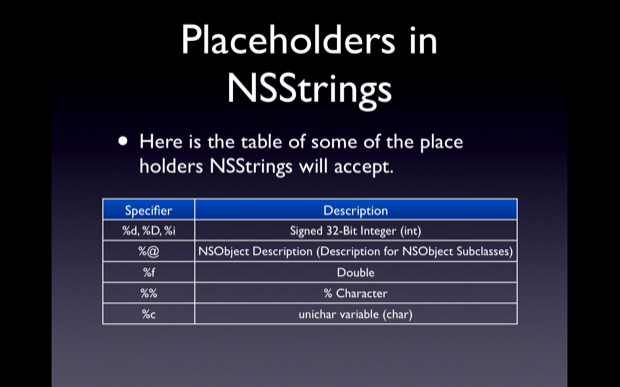
  5. Here is a a breakdown of out new line of code.
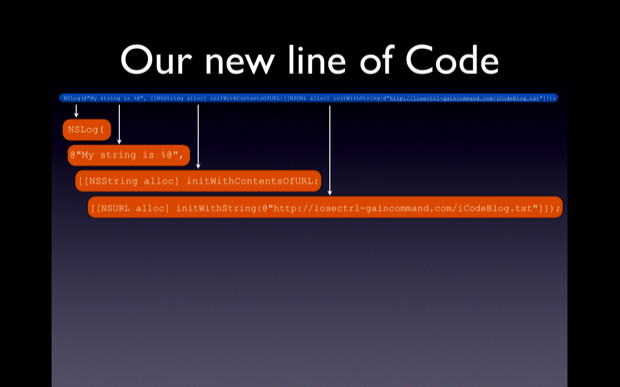
picture-30

picture-31

  • Martin

    Movie link seems to be broken.

  • http://vtsib.wordpress.com vtsib

    The link of the screencast is wrong m8. It leeds to a page not found page :(

    Although keep up the good work. Thanks for the tutorial.

  • Tometoyou
  • http://www.rightsprite.com Collin

    Hey everyone. Sorry for the mix up. All fixed. Enjoy,

  • Matt

    When building the 2nd tutorial in 3.0 the app crashes.

    NSLog needs @ added in front of the string, and stringWithContentsofURL needs to be changed the initWithContentsofURL

    NSString *myURLString = @”http://losectrl-gaincommand.com/iCodeBlogHelper/Tutorial2/iCodeBlog.txt”;
    NSURL *myURL = [NSURL URLWithString:myURLString];
    NSString *myString = [[NSString alloc] initWithContentsOfURL:myURL];

    NSLog(@”The string from the internet is: %@”, myString);

  • http://www.gabejacobsblog.com/ Gabe Jacobs

    Amazing tutorial.

    Bravo

  • http://www.rightsprite.com Collin

    Matt,

    You are totally correct, thanks for pointing that out. I will update the post. Thanks

  • http://www.appstoremod.com AppStoreMod

    I really liked the post. I learned a bit. I think you should do more tutorials and explain them like. I know you do some but like yea and I am really gonna enjoy these tuts.

  • Matt

    Colin,

    No problem. It actually helped me cause i had to troubleshoot without very much help.

    Again, great tutorial!

  • http://www.outtoplay.com Brendan

    Colin,

    Really terrific tutorial. Well paced, very clear and utterly appreciated by this ‘code-impaired’ 3D artist. (I teach thesis animation in NYC and I say without hesitation, You are a natural born teacher). I look forward to the next section, and any and all of your future tuts.

    If you’re ever in the NY area, shoot me a note. I owe you a couple of cold beers.

  • http://gtcaz.com Geoff

    Wow! Coming from Ruby (with a bit of Java and C# awhile back), ObjC appears totally mystifying. It’s still pretty challenging, but I really appreciate this introduction. Very helpful.

    I know making a screencast like this can take a lot of time, so I definitely want to thank you for the effort you out into this.

  • http://robotgrrl.com RobotGrrl

    Ohhh! I was always looking for a tutorial that compared Java and Objective-C. Thank you!!!

  • brandon

    Nice job! Definitely worth the time to watch all the way through, can’t wait to see what else you have coming up.

  • Aaron Berk

    I think your tutorials and method of presentation are some of the best I’ve seen. I like how you go beyond the typical “Hello World” examples and present real-world examples instead. Thank you SO much!

  • Brian Kendig

    Collin,

    Just an FYI – in your post, you changed one use of “stringWithContentsofURL” to “initWithContentsOfURL”, but you missed the other place that “stringWithContentsofURL” appears, so the app still won’t work under 3.0. Good thing I looked in the comments before I got frustrated. :)

  • Fernando

    Amazing tutorial that was very helpful. The only question I have is how do you go about finding useful parts of the Cocoa frameworks. For example, you are using NSString and NSUrl pretty fluidly here, which is great. But how would an inexperienced programmer find out about how to use these? Is there a simple manner of which you can search through the framework so that you can identify what parts of it you will need to accomplish tasks?

  • http://www.rightsprite.com Collin

    Hey Fernando,

    Great question. I use the documentation in xCode. This can be reached by going to Help -> Documentation and then searching. OR you can hold option and Double Click on a Class name such as NSString to bring up that specific class and its related methods and attributes. I will make sure to include this in the next screencast

    Thanks for reading!

  • Chad

    Awesome tutorial! Thanks for that very informative introduction to Objective-C.

  • Graham

    Great post. BTW, the change to initWithContentsOfURL hasn’t been put into the code for example 2 yet ;)

    Keep up the good work!

  • rob

    hey collin,
    im coming from a vb6! background and trying to immerse myself in objective-c with the hope some of it will stick.
    really enjoyed your tutorial, i think you did a good job pitching to newbies (where nearly everyone else falls over at the starting block)
    cheers

  • Linda

    THANK you Colin. Keep up the helpful work.

  • Slim

    Thanks a lot, that’s so useful !

    I hope more similar tutorials will be posted going more complicated in a gradual pace.

    Thanks again

  • Andrew

    This tutorial really helped me understand the stuff from the other tutorials on this site. I can’t wait for more tutorials.

  • http://www.pupsor.com Pupsor

    Hello! It’s very good tutorial and very easy for start. I have a question about books, what do you recommend for good start? which books? Thank you a lot

  • http://www.proofbuddy.com Ryan

    Perfect timing on this. I started playing around with iPhone development and realized that I didn’t know enough ObjC to get by. So I’ve been out scrounging around the internet looking for good tutorials.

  • Dennis

    Thanks for the tutorials! Great job. You’ve really helped me a lot. Keep up the good work.

  • http://twitter.com/lesseffective Lewis

    Fantastic tutorial and glad I finally found it after stumbling on a lot of halfway tutorials out there. I was feeling pretty dumb with a decent background in C++ and Java and absolutely NO clue what was going on in some of the sample code I was trying to decipher.

    This tutorial has been a Rosetta’s stone for me and I look forward to checking out the follow up I saw before.

    Thanks Collin!

  • http://www.rtrsolutions.com/ LockeCole117

    The link appears to be broken again, could you post the screencast on Vimeo instead?

  • Contrite

    I was looking for the screencast as well. Would appreciate it you could let me know when it’s back up! Thanks!

  • Richard

    Hi, this tutorial is exactly what I have been looking for – please get the link to the screencast working again!

    Great site BTW.

  • Simon

    Link to the video seems to be broken again :-(

    Please update as I would really like to watch it.

  • http://www.carbonrabbit.com Carbon Rabbit

    Um, wow. Absolutely perfect. I’m a management consultant and this is an amazingly great educational report. Things were structured, clear, and are set up from the perspective of the reader. You have my vote of confidence and just found yourself a loyal reader/subscriber (your feed has been added!) Thanks a ton.

  • artaxerxes

    Is nesting broken/deprecated in the latest SDK?

  • http://indev.nl Matthijn

    Well, I think you might just have a new reader, finaly an easy beginning of cocoa and objective C, not that I can’t program (I’m pretty advanced with PHP, (OOP, MVC and other design patterns)) but somehow couldnt seem to get the grasp of Objective-C.

    Read lots of documentation from Apple, and looked at some PDF books, but none where really clear, this is :)

  • Tylor

    Links not working…. Please fix! Thanks!!!

  • JD

    Excellent tutorial! I appreciate you taking the time and effort to produce the examples. I am coming from programming Windows Mobile (C#) and you are making the switch very pleasant. Happy coding!

  • Wes

    The link is broken. Please update the link, i’d lovw to check out this video.

  • Jon

    Video link broken for me too… can it be posted on Vimeo? Thanks!

  • Shishir

    Yes, someone please fix the link!

  • Kinara

    Would really appreciate if you could fix the link to the Video.

    Thanx

  • http://www.rightsprite.com Collin

    Video fixed. Sorry about that.

  • dave

    initWithContentsofURL should be initWithContentsOfURL

  • dave

    Collin, please correct this lovely tutorial so it will be a great
    tutorial.

    // right
    NSString *myString = [NSString stringWithContentsOfURL:myURL];

    // right
    NSString *myString = [[NSString alloc] initWithContentsOfURL:myURL];

    //wrong
    NSString *myString = [[NSString alloc] stringWithContentsOfURL:myURL];

  • Ben

    Great Tutorial – really helpful for a newbie like me… this site is well and truly bookmarked…

    I was wondering why my test was returning (null)… looks like the URL for the text file is offline… Whoops..

  • nFieldFlyGuy

    Phenomenal tutorial. You can’t get too basic for newbies like myself. I really appreciate the screencasts. thanks for your work…Mark

  • josh

    I think the URL from tutorial 2 is missing. Code still works, but comes up nil. I’m guessing it is because you changed servers. Also, corrections are in the comments for Tutorial 2 (initWithContentsOfURL), but would be nice to have them in the body of the article.

    Thanks so much for doing these though. They help tremendously!

  • http://rangeway.tv,speed-skating.co.uk Mike

    At last I can really get started! Programmed with C++ in the distant past and needed some cobwebs blown away as well as learning the new stuff for Objective-C. I hope you can find the time to continue.
    Regards, Mike.

  • Nicholaus Serrano

    I think im doing something wrong. When i open up this project a lot of things are different then what appears on your screen. Grant it, it has been two years since the video has been published. The problem lies within the execution of the code. Once i debug it and go it shows the app launch on the Simulated iphone but i get no print out of the counting. Please enlighten me, you are a great teacher and i hope to get past to road block in order to continue learning. Thanks.

  • Abhay

    Hi Nicholaus,

    Are you looking printing statements in “Debugger Console”?. Make sure that you can see that windows. Many times it not visible. You should see (gdb) prompt on debugger console. Also make sure that you are written correct NLog() statements. And last, which XCode version and SDK version are you using? Looks like you are using latest XCode4 which is much different than current 3.2.5 version (similar to shown in above screen).

  • http://profiles.google.com/bswick33 Brun J. Swick

    I’m wondering about your code when nesting the methods. When writing the code you did not alloc the NSURL, but in the breakdown you did. Do you need to alloc the URL when nesting?

  • Mohammed Sharif

    Excellent work. Really appreciated.

  • http://www.facebook.com/DARKLORD1900 Ajaz Ahmed

    Very Decent Tutorial ;) ) 

    just picked up a bug for u !” 

    NSString *myString = [[NSString alloc] stringWithContentsofURL:myURL]; // Wrong

    NSString *myString = [[NSString alloc] initWithContentsOfURL:myURL];/*Correct*/

  • http://www.facebook.com/DARKLORD1900 Ajaz Ahmed

    Very Decent Tutorial ;) ) 

    just picked up a bug for u !” 

    NSString *myString = [[NSString alloc] stringWithContentsofURL:myURL]; // Wrong

    NSString *myString = [[NSString alloc] initWithContentsOfURL:myURL];/*Correct*/

  • Anonymous

    There is no “applicationdidfinishlaunching” thing in my code. Where should I put the code?

blog comments powered by Disqus